# Transition from Router to Navigation
## Architecture Differences
In the ArkUI component tree hierarchy, pages that were originally managed by the **Router** module are located beneath the stage management node of the page stack. **Navigation**, as a navigation container component, can be mounted under a single page node and can also be stacked and nested. **Navigation** manages the title bar, content area, and toolbar. The content area is designed to display the content of custom pages and supports page routing capabilities. The design of **Navigation** has the following advantages:
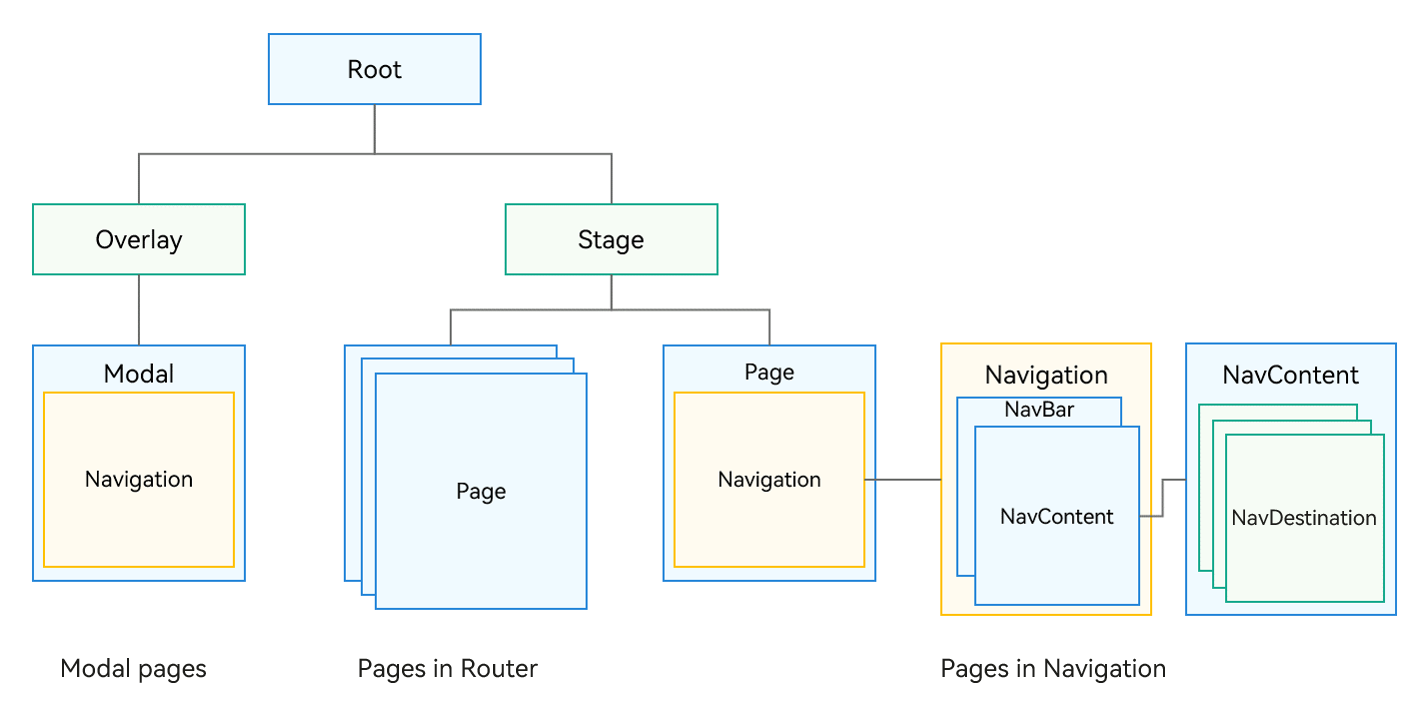
1. Explicitly distinguishes the title bar, content area, and toolbar in the API for enhanced management and UX animation flexibility.
2. Provides the concept of a routing container, allowing you to decide the location of the routing container, and supports display in a modal, sheet, or dialog box.
3. Integrates UX design and one-time development for multi-device deployment capabilities, with default capabilities for unified title display, page switching, and single or double column adaptation.
4. Enables flexible page configuration by allowing you to determine the relationship between page aliases and UI through UIBuilder.
5. Transforms page transition animations into component property animations, offering a richer and more flexible range of transition effects.
6. Provides an inheritable page stack object for improved page display management.
## Capability Comparison
| Scenario | Navigation | Router |
| --------------------------------------------- | ------------------------------------- | -------------------------------------- |
| One-time development for multi-device deployment | Supported. The Auto mode is provided to automatically adapt to single- or double-column layout. | Not supported |
| Navigation to a specific page | pushPath & pushDestination | pushUrl & pushNameRoute |
| Navigation to a page within an HSP | Supported | Supported |
| Navigation to a page within a HAR | Supported | Supported |
| Passing parameters during navigation | Supported | Supported |
| Obtaining parameters of a specific page | Supported | Not supported |
| Type of parameters passed | Passed as an object | Passed as an object, methods not supported within the object|
| Navigation result callback | Supported | Supported |
| Navigation to a singleton page | Supported | Supported |
| Return to a previous page | Supported | Supported |
| Passing parameters on returning to a previous page | Supported | Supported |
| Returning to a specific route | Supported | Supported |
| Dialog box for returning to a previous page | Supported, implemented through route interception | showAlertBeforeBackPage |
| Route replacement | replacePath & replacePathByName | replaceUrl & replaceNameRoute |
| Clearing the navigation stack | clear | clear |
| Removing specific routes from the navigation stack | removeByIndexes & removeByName | Not supported |
| Transition animation | Supported | Supported |
| Custom transition animation | Supported | Supported, with limited animation types |
| Disabling transition animation | Supported, with global or one-time setting | Supported, by setting **duration** in the **pageTransition** API to **0**|
| Shared element animation with **geometryTransition** | Supported (shared between **NavDestination** components) | Not supported |
| Listening for page lifecycle | UIObserver.on('navDestinationUpdate') | UIObserver.on('routerPageUpdate') |
| Obtaining a page stack object | Supported | Not supported |
| Route interception | Supported through **setInterception** | Not supported |
| Route stack information query | Supported | getState() & getLength() |
| Move operations within the navigation stack | moveToTop & moveIndexToTop | Not supported |
| Immersive pages | Supported | Not supported; requires window configuration |
| Setting the title bar and toolbar| Supported | Not supported |
| Modal nested routing | Supported | Not supported |
## Transition Guidelines
### Page Structure
Pages managed by **Router** are @Entry decorated components, each of which must be declared in **main_page.json**.
```json
// main_page.json
{
"src": [
"pages/Index",
"pages/pageOne",
"pages/pageTwo"
]
}
```
The following is an example of a page managed by **Router**.
```ts
// index.ets
import { router } from '@kit.ArkUI';
@Entry
@Component
struct Index {
@State message: string = 'Hello World';
build() {
Row() {
Column() {
Text(this.message)
.fontSize(50)
.fontWeight(FontWeight.Bold)
Button('router to pageOne', { stateEffect: true, type: ButtonType.Capsule })
.width('80%')
.height(40)
.margin(20)
.onClick(() => {
router.pushUrl({
url: 'pages/pageOne' // Target URL.
}, router.RouterMode.Standard, (err) => {
if (err) {
console.error(Invoke pushUrl failed, code is ${err.code}, message is ${err.message});
return;
}
console.info('Invoke pushUrl succeeded.');
})
})
}
.width('100%')
}
.height('100%')
}
}
```
```ts
// pageOne.ets
import { router } from '@kit.ArkUI';
@entry
@Component
struct pageOne {
@State message: string = 'This is pageOne';
build() {
Row() {
Column() {
Text(this.message)
.fontSize(50)
.fontWeight(FontWeight.Bold)
Button('router back to Index', { stateEffect: true, type: ButtonType.Capsule })
.width('80%')
.height(40)
.margin(20)
.onClick(() => {
router.back();
})
}
.width('100%')
}
.height('100%')
}
}
```
Pages using **Navigation** are divided into navigation pages and subpages. The navigation page, also known as a NavBar, is a child component of **Navigation**, while subpages are child components of **NavDestination**.
The following is an example of the navigation page using **Navigation**.
```ts
// index.ets
@Entry
@Component
struct Index {
pathStack: NavPathStack = new NavPathStack()
build() {
Navigation(this.pathStack) {
Column() {
Button('Push PageOne', { stateEffect: true, type: ButtonType.Capsule })
.width('80%')
.height(40)
.margin(20)
.onClick(() => {
this.pathStack.pushPathByName('pageOne', null)
})
}.width('100%').height('100%')
}
.title("Navigation")
}
}
```
The following is an example of a subpage using **Navigation**.
```ts
// PageOne.ets
@Builder
export function PageOneBuilder() {
PageOne()
}
@Component
export struct PageOne {
pathStack: NavPathStack = new NavPathStack()
build() {
NavDestination() {
Column() {
Button('Back to Home', { stateEffect: true, type: ButtonType.Capsule })
.width('80%')
.height(40)
.margin(20)
.onClick(() => {
this.pathStack.clear()
})
}.width('100%').height('100%')
}.title('PageOne')
.onReady((context: NavDestinationContext) => {
this.pathStack = context.pathStack
})
}
}
```
Each subpage also needs to be configured in the system configuration file **route_map.json** (see [System Routing Table](arkts-navigation-navigation.md#system-routing-table)).
```json
// Configure {"routerMap": "$profile:route_map"} in the project configuration file module.json5.
// route_map.json
{
"routerMap": [
{
"name": "pageOne",
"pageSourceFile": "src/main/ets/pages/PageOne.ets",
"buildFunction": "PageOneBuilder",
"data": {
"description": "this is pageOne"
}
}
]
}
```
### Route Operations
To use the **Router** for page operations, you must import the **@ohos.router** module.
```ts
import { router } from '@kit.ArkUI';
// push page
router.pushUrl({ url:"pages/pageOne", params: null })
// pop page
router.back({ url: "pages/pageOne" })
// replace page
router.replaceUrl({ url: "pages/pageOne" })
// clear all page
router.clear()
// Obtain the size of the page stack.
let size = router.getLength()
// Obtain the page state.
let pageState = router.getState()
```
To use the **Navigation** component for page operations, call APIs of the [NavPathStack](../reference/apis-arkui/arkui-ts/ts-basic-components-navigation.md#navpathstack10) object. You need to first create a **NavPathStack** object and pass it into **Navigation**.
```ts
@Entry
@Component
struct Index {
pathStack: NavPathStack = new NavPathStack()
build() {
// Set NavPathStack and pass it to Navigation.
Navigation(this.pathStack) {
...
}.width('100%').height('100%')
.title("Navigation")
}
}
// push page
this.pathStack.pushPath({ name: 'pageOne' })
// pop page
this.pathStack.pop()
this.pathStack.popToIndex(1)
this.pathStack.popToName('pageOne')
// replace page
this.pathStack.replacePath({ name: 'pageOne' })
// clear all page
this.pathStack.clear()
// Obtain the size of the page stack.
let size = this.pathStack.size()
// Remove all pages whose name is PageOne from the stack.
this.pathStack.removeByName("pageOne")
// Remove the page with the specified index.
this.pathStack.removeByIndexes([1,3,5])
// Obtain all page names in the stack.
this.pathStack.getAllPathName()
// Obtain the parameters of the page whose index is 1.
this.pathStack.getParamByIndex(1)
// Obtain the parameters of the PageOne page.
this.pathStack.getParamByName("pageOne")
// Obtain the index set of the PageOne page.
this.pathStack.getIndexByName("pageOne")
...
```
**Router** serves as a global module that can be used across any page, whereas **Navigation** operates as a component. If subpages within a **Navigation** component need to perform routing operations, they must access the **NavPathStack** object held by **Navigation**. The following are several methods to obtain the **NavPathStack** object:
**Method 1**: Use @Provide and @Consume (this method creates coupling and is not recommended).
```ts
// Navigation root container
@Entry
@Component
struct Index {
// Navigation creates a NavPathStack object decorated by @Provide.
@Provide('pathStack') pathStack: NavPathStack
build() {
Navigation(this.pathStack) {
...
}.width('100%').height('100%')
}
.title("Navigation")
}
}
// Navigation subpage
@Component
export struct PageOne {
// NavDestination obtains the NavPathStack object through @Consume.
@Consume('pathStack') pathStack: NavPathStack;
build() {
NavDestination() {
...
}
.title("PageOne")
}
}
```
**Method 2**: Use the **OnReady** callback.
```ts
@Component
export struct PageOne {
pathStack: NavPathStack = new NavPathStack()
build() {
NavDestination() {
...
}.title('PageOne')
.onReady((context: NavDestinationContext) => {
this.pathStack = context.pathStack
})
}
}
```
**Method 3**: Call the global AppStorage API.
```ts
@Entry
@Component
struct Index {
pathStack: NavPathStack = new NavPathStack()
// Set a NavPathStack object globally.
aboutToAppear(): void {
AppStorage.setOrCreate("PathStack", this.pathStack)
}
build() {
Navigation(this.pathStack) {
...
}.width('100%').height('100%')
}
.title("Navigation")
}
}
// Navigation subpage
@Component
export struct PageOne {
// The subpage obtains the global NavPathStack object.
pathStack: NavPathStack = AppStorage.get("PathStack") as NavPathStack
build() {
NavDestination() {
...
}
.title("PageOne")
}
}
```
**Method 4**: Call the custom component query API. For details, see [queryNavigationInfo](../reference/apis-arkui/arkui-ts/ts-custom-component-api.md#querynavigationinfo12).
```ts
import { uiObserver } from '@kit.ArkUI';
// Custom component on the subpage
@Component
struct CustomNode {
pathStack : NavPathStack = new NavPathStack()
aboutToAppear() {
// query navigation info
let navigationInfo : NavigationInfo = this.queryNavigationInfo() as NavigationInfo
this.pathStack = navigationInfo.pathStack;
}
build() {
Row() {
Button('Go to PageTwo')
.onClick(()=>{
this.pathStack.pushPath({ name: 'pageTwo' })
})
}
}
}
```
### Lifecycle
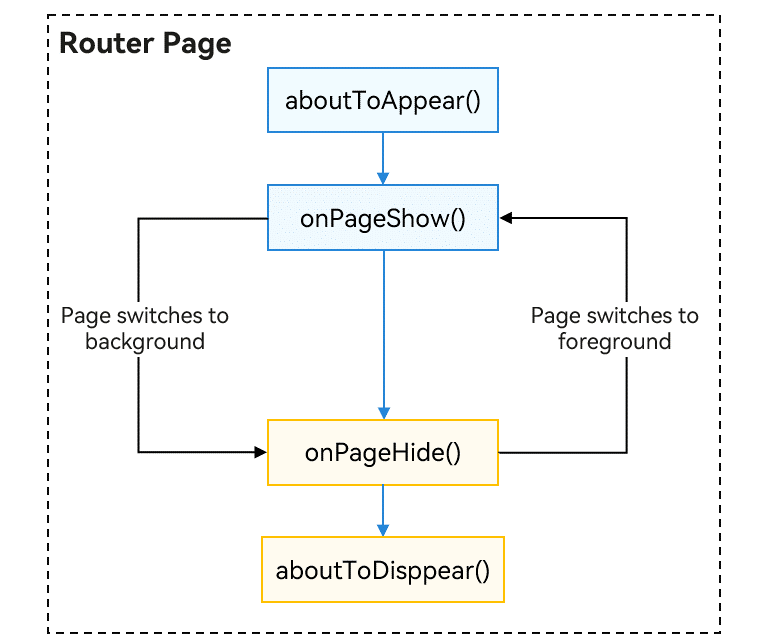
The lifecycle of a **Router** page is managed by universal methods within the @Entry page, which mainly includes the following lifecycle events:
```ts
// Callback after the page is created and mounted to the tree
aboutToAppear(): void {
}
// Callback before the page is destroyed and unmounted
aboutToDisappear(): void {
}
// Callback when the page is displayed
onPageShow(): void {
}
// Callback when the page is hidden
onPageHide(): void {
}
```
The sequence of these lifecycle events is illustrated in the figure below.
**Navigation**, as a routing container, hosts its lifecycle within the **NavDestination** component and exposes lifecycle events as component events.
For details about the lifecycle, see [Page Lifecycle](arkts-navigation-navigation.md#page-lifecycle).
```ts
@Component
struct PageOne {
aboutToDisappear() {
}
aboutToAppear() {
}
build() {
NavDestination() {
...
}
.onWillAppear(()=>{
})
.onAppear(()=>{
})
.onWillShow(()=>{
})
.onShown(()=>{
})
.onWillHide(()=>{
})
.onHidden(()=>{
})
.onWillDisappear(()=>{
})
.onDisAppear(()=>{
})
}
}
```
### Transition Animation
Both **Router** and **Navigation** offer built-in system transition animations as well as the capability to customize these animations.
For **Router**, custom page transition animations are implemented through the universal method **pageTransition()**. For details, see [Page Transition Animation](arkts-page-transition-animation.md).
For **Navigation**, a routing container component, page transition animations are essentially property animations between components. You can custom page transition animations through the [customNavContentTransition](../reference/apis-arkui/arkui-ts/ts-basic-components-navigation.md#customnavcontenttransition11) event in **Navigation**. For details, see [Customizing a Transition](arkts-navigation-navigation.md#customizing-a-transition). (Note: Dialog-type pages currently do not have transition animations.)
### Shared Element Transition
To animate shared elements during page transitions with **Router**, use the **sharedTransition** API. For details, see
[Shared Element Transition (sharedTransition)](../reference/apis-arkui/arkui-ts/ts-transition-animation-shared-elements.md).
To animate shared elements during page transitions with **Navigation**, use the **geometryTransition** API. For details, see [Defining a Shared Element Transition](arkts-navigation-navigation.md#defining-a-shared-element-transition).
### Cross-Package Routing
To implement cross-package routing, with **Router**, use named routes.
1. In the [HAR](../quick-start/har-package.md) or [HSP](../quick-start/in-app-hsp.md) you want to navigate to, name the @Entry decorated custom component in [EntryOptions](../quick-start/arkts-create-custom-components.md#entryoptions10).
```ts
// library/src/main/ets/pages/Index.ets
// library is the new custom name of the shared package.
@Entry({ routeName: 'myPage' })
@Component
export struct MyComponent {
build() {
Row() {
Column() {
Text('Library Page')
.fontSize(50)
.fontWeight(FontWeight.Bold)
}
.width('100%')
}
.height('100%')
}
}
```
2. When the configuration is successful, import the named route page to the page from which you want to navigate and perform the navigation.
```ts
import { router } from '@kit.ArkUI';
import { BusinessError } from '@kit.BasicServicesKit';
import('library/src/main/ets/pages/Index'); // Import the named route page from the library of the shared package.
@Entry
@Component
struct Index {
build() {
Flex({ direction: FlexDirection.Column, alignItems: ItemAlign.Center, justifyContent: FlexAlign.Center }) {
Text('Hello World')
.fontSize(50)
.fontWeight(FontWeight.Bold)
.margin({ top: 20 })
.backgroundColor('#ccc')
.onClick(() => { // Click to go to a page in another shared package.
try {
router.pushNamedRoute({
name: 'myPage',
params: {
data1: 'message',
data2: {
data3: [123, 456, 789]
}
}
})
} catch (err) {
let message = (err as BusinessError).message
let code = (err as BusinessError).code
console.error(`pushNamedRoute failed, code is ${code}, message is ${message}`);
}
})
}
.width('100%')
.height('100%')
}
}
```
As a routing component, **Navigation** natively supports cross-package navigation.
1. Develop a custom component in the HSP (HAR) that you want to navigate to, and declare it as **export**.
```ts
@Component
export struct PageInHSP {
build() {
NavDestination() {
...
}
}
}
```
2. Export the component in the **index.ets** file of the HSP (HAR).
```ts
export { PageInHSP } from "./src/main/ets/pages/PageInHSP"
```
3. After configuring the project dependencies for the HSP (HAR), import the custom component into **mainPage** and add it to **pageMap** for normal use.
```
// 1. Import the cross-package route page.
import { PageInHSP } from 'library/src/main/ets/pages/PageInHSP'
@Entry
@Component
struct mainPage {
pageStack: NavPathStack = new NavPathStack()
@Builder pageMap(name: string) {
if (name === 'PageInHSP') {
// 2. Define the route mapping table.
PageInHSP()
}
}
build() {
Navigation(this.pageStack) {
Button("Push HSP Page")
.onClick(() => {
// 3. Navigate to the page in the HSP.
this.pageStack.pushPath({ name: "PageInHSP"});
})
}
.navDestination(this.pageMap)
}
}
```
In the above approaches, static dependencies are used for cross-package routing. In large-scale projects, inter-module development generally requires decoupling, which relies on the capability of dynamic routing.
### Dynamic Routing
Dynamic routing facilitates the reuse of service modules across different products (HAPs) and ensures module decoupling by using a routing table for transitions without interdependencies. It also streamlines the expansion and integration of routing features.
Business modules expose a set of pages for various scenarios, which are managed through a unified routing table. Products can register the routing tables of the required modules.
**Key Benefits of Dynamic Routing**
1. Route definitions can include not only the URL for navigation but also a variety of extended configurations, such as default orientation (landscape or portrait) and authentication requirements, for unified handling during routing.
2. Each route is assigned a name, allowing navigation by name rather than by file path, which simplifies the routing process.
3. Pages can be loaded using dynamic import (lazy loading), preventing the initial page from loading a large amount of code that could cause lag.
**Implementing Dynamic Routing with Router**
1. Definition: Add new routes to the routing table -> Bind page files to route names (decorators) -> Associate loading functions with page files (dynamic import functions).
2. Registration: Register routes (inject the routing table of dependent modules as needed in the entry ability).
3. Navigation: Check the routing table (for registered route names) -> Pre-routing hooks (dynamic import for page loading) -> Perform routing -> Post-routing hooks (common processing, such as tracking).
**Implementing Dynamic Routing with Navigation**
**Solution 1: Custom Routing Table**
The basic implementation is similar to the aforementioned dynamic routing with **Router**.
1. Create a custom routing management module, which is depended on by all modules providing routing pages.
2. When constructing the **Navigation** component, inject **NavPathStack** into the routing management module, which then encapsulates **NavPathStack** and provides routing capabilities.
3. Instead of providing components directly, each routing page offers a build function wrapped with @build, which is then further encapsulated with **WrappedBuilder** for global encapsulation.
4. Each routing page registers its module name, route name, and the **WrappedBuilder**-encapsulated build function into the routing management module.
5. The routing management module completes dynamic imports and route transitions as needed.
**Solution 2: System Routing Table**
Since API version 12, **Navigation** supports a system-wide cross-module routing table solution, which centralizes routing management through individual **router_map.json** files in each service module (HSP/HAR). When a route transition is initiated using **NavPathStack**, the system automatically performs dynamic module loading, component construction, and completes the route transition, achieving module decoupling at the development level.
For details, see [System Routing Table](arkts-navigation-navigation.md#system-routing-table).
### Lifecycle Listening
You can use the observer to register for lifecycle events with the **Router**. For details about the APIs, see [observer.on('routerPageUpdate')](../reference/apis-arkui/js-apis-arkui-observer.md#observeronrouterpageupdate11).
```ts
import { uiObserver } from '@kit.ArkUI';
function callBackFunc(info: uiObserver.RouterPageInfo) {
console.info("RouterPageInfo is : " + JSON.stringify(info))
}
// used in ability context.
uiObserver.on('routerPageUpdate', this.context, callBackFunc);
// used in UIContext.
uiObserver.on('routerPageUpdate', this.getUIContext(), callBackFunc);
```
A registered callback is invoked when there is a change in the page state. You can obtain relevant page information such as the page name, index, path, and lifecycle status through the parameters passed to the callback.
**Navigation** also allows you to register for lifecycle events through the observer.
```ts
export default class EntryAbility extends UIAbility {
...
onWindowStageCreate(windowStage: window.WindowStage): void {
...
windowStage.getMainWindow((err: BusinessError, data) => {
...
windowClass = data;
// Obtain a UIContext instance.
let uiContext: UIContext = windowClass.getUIContext();
// Obtain a UIObserver instance.
let uiObserver : UIObserver = uiContext.getUIObserver();
// Register a listener for DevNavigation state updates.
uiObserver.on("navDestinationUpdate",(info) => {
// NavDestinationState.ON_SHOWN = 0, NavDestinationState.ON_HIDE = 1
if (info.state == 0) {
// Actions to perform when the NavDestination component is shown.
console.info('page ON_SHOWN:' + info.name.toString());
}
})
})
}
}
```
### Page Information Query
To achieve decoupling between custom components and their containing pages, a global API for querying page information is provided within custom components.
With **Router**, you can use the [queryRouterPageInfo](../reference/apis-arkui/arkui-ts/ts-custom-component-api.md#queryrouterpageinfo12) API to query information about the current page where the custom component resides. The return value includes the following properties, with **pageId** being the unique ID for the page.
| Name | Type | Mandatory| Description |
| -------------------- | --------------------------- | ---- | ------------------------------ |
| context | UIAbilityContext/ UIContext | Yes | Context information of the page.|
| index | number | Yes | Position of the page in the stack. |
| name | string | Yes | Name of the page. |
| path | string | Yes | Path of the page. |
| state | RouterPageState | Yes | Status of the page. |
| pageId12+ | string | Yes | Unique ID of the routerPage page. |
```ts
import { uiObserver } from '@kit.ArkUI';
// Custom component on the page
@Component
struct MyComponent {
aboutToAppear() {
let info: uiObserver.RouterPageInfo | undefined = this.queryRouterPageInfo();
}
build() {
// ...
}
}
```
With **Navigation**, you can use the [queryNavDestinationInfo](../reference/apis-arkui/arkui-ts/ts-custom-component-api.md#querynavdestinationinfo) API to query information about the current page where the custom component resides. The return value includes the following properties, with **navDestinationId** being the unique ID for the page.
| Name | Type | Mandatory| Description |
| ----------------------------- | ------------------- | ---- | -------------------------------------------- |
| navigationId | ResourceStr | Yes | ID of the **Navigation** component that contains the target **NavDestination** component.|
| name | ResourceStr | Yes | Name of the **NavDestination** component. |
| state | NavDestinationState | Yes | State of the **NavDestination** component. |
| index12+ | number | Yes | Index of the **NavDestination** component in the navigation stack. |
| param12+ | Object | No | Parameters of the **NavDestination** component. |
| navDestinationId12+ | string | Yes | Unique ID of the **NavDestination** component. |
```ts
import { uiObserver } from '@kit.ArkUI';
@Component
export struct NavDestinationExample {
build() {
NavDestination() {
MyComponent()
}
}
}
@Component
struct MyComponent {
navDesInfo: uiObserver.NavDestinationInfo | undefined
aboutToAppear() {
this.navDesInfo = this.queryNavDestinationInfo();
console.log('get navDestinationInfo: ' + JSON.stringify(this.navDesInfo))
}
build() {
// ...
}
}
```
### Route Interception
**Router** does not natively provide route interception, so you must implement it by creating custom routing APIs for redirection and interception logic.
**Navigation** provides the [setInterception](../reference/apis-arkui/arkui-ts/ts-basic-components-navigation.md#setinterception12) API for setting callbacks to intercept page navigation. For details, see [Route Interception](arkts-navigation-navigation.md#route-interception).