# Visible Area Change Event
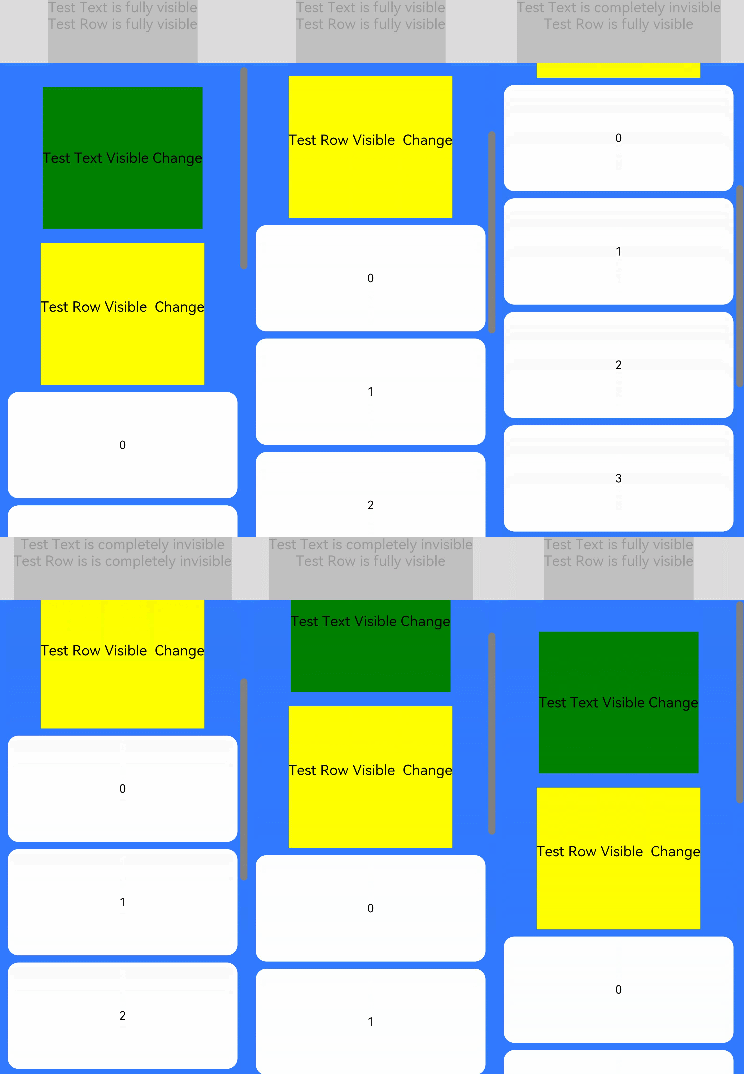
The visible area change event of a component refers to the change in the visual portion of the component on the screen. It can be used to determine whether the component is completely or partially displayed on the screen. It is usually applicable to scenarios such as advertisement exposure tracing.
> **NOTE**
>
> The APIs of this module are supported since API version 9. Updates will be marked with a superscript to indicate their earliest API version.
## onVisibleAreaChange
onVisibleAreaChange(ratios: Array<number>, event: (isVisible: boolean, currentRatio: number) => void): T
Called when the visible area of the component changes.
**Atomic service API**: This API can be used in atomic services since API version 11.
**System capability**: SystemCapability.ArkUI.ArkUI.Full
**Parameters**
| Name | Type | Mandatory | Description |
| ------ | --------------------------------------------------- | ---- | ------------------------------------------------------------ |
| ratios | Array<number> | Yes | Threshold array. Each threshold represents a ratio of the component's visible area (that is, the area of the component that is visible on screen; only the area within the parent component is counted) to the component's total area. This callback is invoked when the ratio of the component's visible area to its total area is greater than or less than the threshold. The value range of the threshold is [0.0, 1.0]. If the threshold set exceeds this range, the value **0.0** or **1.0** will be used.
**NOTE**
When the value is close to the boundary 0 or 1, it is rounded off with a round-off error not greater than 0.001. For example, 0.9997 is rounded off to 1. |
| event | (isVisible: boolean, currentRatio: number) => void) | Yes | - **isVisible**: whether the ratio of the component's visible area to its total area is greater than the previous one. The value **true** means that the ratio is greater than the previous one, and **false** means the opposite.
- **currentRatio**: ratio of the component's visible area to its total area when this callback is invoked. |
**Return value**
| Type | Description |
| -------- | -------- |
| T | Current component. |
> **NOTE**
>
> This API applies only to the scenario where the component's layout area exceeds or is not within the current screen display area. It does not apply to the scenario where the visible area changes due to component stacking (by using [\](ts-container-stack.md) or [z-order control](ts-universal-attributes-z-order.md)) or as a result of calling transformation APIs such as **offset** or **translate**. Any area of a component that extends beyond its parent component regarded as an invisible area.
## Example
```ts
// xxx.ets
@Entry
@Component
struct ScrollExample {
scroller: Scroller = new Scroller()
private arr: number[] = [0, 1, 2, 3, 4, 5, 6, 7, 8, 9]
@State testTextStr: string = 'test'
@State testRowStr: string = 'test'
build() {
Column() {
Column() {
Text(this.testTextStr)
.fontSize(20)
Text(this.testRowStr)
.fontSize(20)
}
.height(100)
.backgroundColor(Color.Gray)
.opacity(0.3)
Scroll(this.scroller) {
Column() {
Text("Test Text Visible Change")
.fontSize(20)
.height(200)
.margin({ top: 50, bottom: 20 })
.backgroundColor(Color.Green)
// Set ratios to [0.0, 1.0] to invoke the callback when the component is fully visible or invisible on screen.
.onVisibleAreaChange([0.0, 1.0], (isVisible: boolean, currentRatio: number) => {
console.info('Test Text isVisible: ' + isVisible + ', currentRatio:' + currentRatio)
if (isVisible && currentRatio >= 1.0) {
console.info('Test Text is fully visible. currentRatio:' + currentRatio)
this.testTextStr = 'Test Text is fully visible'
}
if (!isVisible && currentRatio <= 0.0) {
console.info('Test Text is completely invisible.')
this.testTextStr = 'Test Text is completely invisible'
}
})
Row() {
Text('Test Row Visible Change')
.fontSize(20)
.margin({ bottom: 20 })
}
.height(200)
.backgroundColor(Color.Yellow)
.onVisibleAreaChange([0.0, 1.0], (isVisible: boolean, currentRatio: number) => {
console.info('Test Row isVisible:' + isVisible + ', currentRatio:' + currentRatio)
if (isVisible && currentRatio >= 1.0) {
console.info('Test Row is fully visible.')
this.testRowStr = 'Test Row is fully visible'
}
if (!isVisible && currentRatio <= 0.0) {
console.info('Test Row is completely invisible.')
this.testRowStr = 'Test Row is completely invisible'
}
})
ForEach(this.arr, (item:number) => {
Text(item.toString())
.width('90%')
.height(150)
.backgroundColor(0xFFFFFF)
.borderRadius(15)
.fontSize(16)
.textAlign(TextAlign.Center)
.margin({ top: 10 })
}, (item:number) => (item.toString()))
}.width('100%')
}
.backgroundColor(0x317aff)
.scrollable(ScrollDirection.Vertical)
.scrollBar(BarState.On)
.scrollBarColor(Color.Gray)
.scrollBarWidth(10)
.onWillScroll((xOffset: number, yOffset: number, scrollState: ScrollState) => {
console.info(xOffset + ' ' + yOffset)
})
.onScrollEdge((side: Edge) => {
console.info('To the edge')
})
.onScrollStop(() => {
console.info('Scroll Stop')
})
}.width('100%').height('100%').backgroundColor(0xDCDCDC)
}
}
```