# Safe Area
A safe area refers to the display area that isn't covered by a status bar, navigation bar, or any other component in the system-defined non-safe-areas. By default, all the content you develop is placed in the safe area. If necessary, you can expand a component's safe area through the [expandSafeArea](#expandsafearea) attribute – without changing the layout, and specify how to make space for the virtual keyboard through the [setKeyboardAvoidMode](#setkeyboardavoidmode11) attribute.
> **NOTE**
>
> This attribute is supported since API version 10. Updates will be marked with a superscript to indicate their earliest API version.
> By default, the notch area is not a non-safe-area, and content can be displayed in this area.
> You can set the notch area as a non-safe-area since API version 12, so that content is not displayed in this area. To do so, add the following to the **module.json5** file:
"metadata": [
{
"name": "avoid_cutout",
"value": "true",
}
],
## expandSafeArea
expandSafeArea(types?: Array<SafeAreaType>, edges?: Array<SafeAreaEdge>)
Sets the safe area to be expanded to.
**Atomic service API**: This API can be used in atomic services since API version 11.
**System capability**: SystemCapability.ArkUI.ArkUI.Full
**Parameters**
| Name| Type | Mandatory| Description |
| ------ | -------------------------------------------------- | ---- | ------------------------------------------------------------ |
| types | Array <[SafeAreaType](ts-types.md#safeareatype10)> | No | Types of the expanded safe area. For the **CUTOUT** type to take effect, the **metadata** item must be added to the configuration file.
Default value:
[SafeAreaType.SYSTEM, SafeAreaType.CUTOUT, SafeAreaType.KEYBOARD] |
| edges | Array <[SafeAreaEdge](ts-types.md#safeareaedge10)> | No | Edges for expanding the safe area.
Default value: [SafeAreaEdge.TOP, SafeAreaEdge.BOTTOM, SafeAreaEdge.START, SafeAreaEdge.END]
The default value expands the safe area on all available edges.|
> **NOTE**
>
> To set the **expandSafeArea** attribute for a component, this component cannot have its width and height fixed (except to a percentage).
>
> The safe area does not restrict the layout or size of components inside, nor does it clip the components.
>
> If the parent container is a scroll container, the **expandSafeArea** attribute does not take effect.
>
> When **expandSafeArea()** is set, no parameter is passed in, and the default value is used. When **expandSafeArea([],[])** is set, an empty array is passed in, and the settings do not take effect.
>
> After **expandSafeArea** is set:
> 1. If **type** is set to **SafeAreaType.KEYBOARD**, the settings take effect without additional conditions.
> 2. If **type** is set to any other value, the settings take effect under the prerequisite that the component can extend to the safe area when the component border overlaps with the safe area. For example, if the height of the status bar is 100, the absolute position of the component on the screen must be 0 <= y <= 100 for the settings to take effect.
>
> When the component extends to the safe area, the system may intercept events in the safe area to preferentially respond to events of system components, such as the status bar.
## setKeyboardAvoidMode11+
setKeyboardAvoidMode(value: KeyboardAvoidMode): void
Sets the avoid mode for the virtual keyboard.
**Atomic service API**: This API can be used in atomic services since API version 11.
**System capability**: SystemCapability.ArkUI.ArkUI.Full
**Parameters**
| Name| Type | Mandatory| Description |
| ------ | ---------------------------------------------------- | ---- | ------------------------------------------------------------ |
| value | [KeyboardAvoidMode](ts-types.md#keyboardavoidmode11) | Yes | Avoid mode of the virtual keyboard.
Default value: **KeyboardAvoidMode.OFFSET**
By default, offset is used to avoid the virtual keyboard.
|
> **NOTE**
> With **KeyboardAvoidMode.RESIZE**, the page is resized to prevent the virtual keyboard from obstructing the view. Regarding components on the page, those whose width and height are set in percentage are resized with the page, and those whose width and height are set to specific values are laid out according to their settings.
>
> When **KeyboardAvoidMode.RESIZE** is used, **expandSafeArea([SafeAreaType.KEYBOARD],[SafeAreaEdge.BOTTOM])** does not take effect.
## getKeyboardAvoidMode
getKeyboardAvoidMode(): KeyboardAvoidMode
Obtains the avoid mode of the virtual keyboard.
**Atomic service API**: This API can be used in atomic services since API version 11.
**System capability**: SystemCapability.ArkUI.ArkUI.Full
**Return value**
| Name | Description |
| ---------------------------------------------------- | ---------------------------------- |
| [KeyboardAvoidMode](ts-types.md#keyboardavoidmode11) | Avoid mode of the virtual keyboard.|
## Example
### Example 1
```ts
// xxx.ets
@Entry
@Component
struct SafeAreaExample1 {
@State text: string = ''
controller: TextInputController = new TextInputController()
build() {
Row() {
Column()
.height('100%').width('100%')
.backgroundImage($r('app.media.bg')).backgroundImageSize(ImageSize.Cover)
.expandSafeArea([SafeAreaType.SYSTEM], [SafeAreaEdge.TOP, SafeAreaEdge.BOTTOM])
}.height('100%')
}
}
```

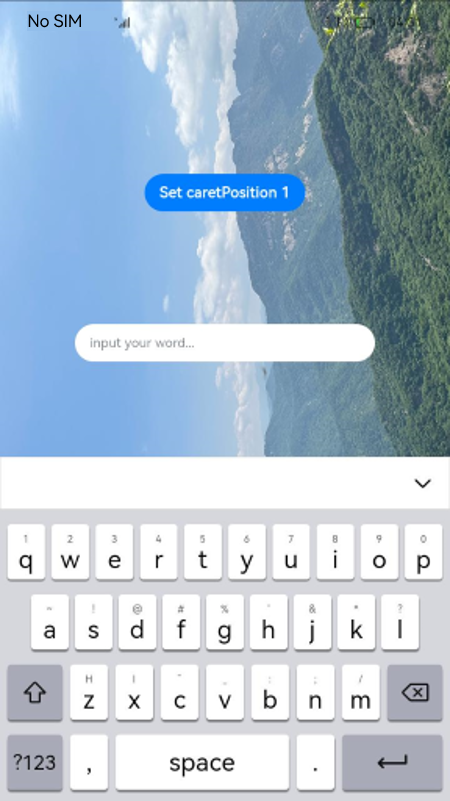
### Example 2
```ts
// xxx.ets
@Entry
@Component
struct SafeAreaExample {
@State text: string = ''
controller: TextInputController = new TextInputController()
build() {
Row() {
Stack() {
Column()
.height('100%').width('100%')
.backgroundImage($r('app.media.bg')).backgroundImageSize(ImageSize.Cover)
.expandSafeArea([SafeAreaType.KEYBOARD, SafeAreaType.SYSTEM])
Column() {
Button('Set caretPosition 1')
.onClick(() => {
this.controller.caretPosition(1)
})
TextInput({ text: this.text, placeholder: 'input your word...', controller: this.controller })
.placeholderFont({ size: 14, weight: 400 })
.width(320).height(40).offset({y: 120})
.fontSize(14).fontColor(Color.Black)
.backgroundColor(Color.White)
}.width('100%').alignItems(HorizontalAlign.Center)
}
}.height('100%')
}
}
```
### Example 3
```ts
// EntryAbility.ets
import { KeyboardAvoidMode } from '@kit.ArkUI';
onWindowStageCreate(windowStage: window.WindowStage) {
// Main window is created, set main page for this ability
hilog.info(0x0000, 'testTag', '%{public}s', 'Ability onWindowStageCreate');
windowStage.loadContent('pages/Index', (err, data) => {
let keyboardAvoidMode = windowStage.getMainWindowSync().getUIContext().getKeyboardAvoidMode();
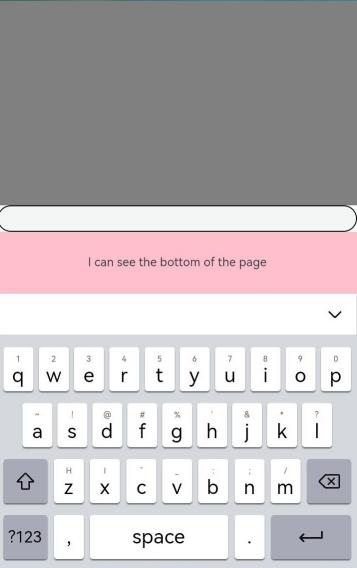
// When the virtual keyboard is displayed, the page is resized to its original height minus the keyboard height.
windowStage.getMainWindowSync().getUIContext().setKeyboardAvoidMode(KeyboardAvoidMode.RESIZE);
if (err.code) {
hilog.error(0x0000, 'testTag', 'Failed to load the content. Cause: %{public}s', JSON.stringify(err) ?? '');
return;
}
hilog.info(0x0000, 'testTag', 'Succeeded in loading the content. Data: %{public}s', JSON.stringify(data) ?? '');
});
}
```
```ts
// xxx.ets
@Entry
@Component
struct KeyboardAvoidExample {
build() {
Column() {
Row().height("30%").width("100%").backgroundColor(Color.Gray)
TextArea().width("100%").borderWidth(1)
Text("I can see the bottom of the page").width("100%").textAlign(TextAlign.Center).backgroundColor(Color.Pink).layoutWeight(1)
}.width('100%').height("100%")
}
}
```
### Example 4
```ts
// EntryAbility.ets
import { KeyboardAvoidMode } from '@kit.ArkUI';
onWindowStageCreate(windowStage: window.WindowStage) {
// Main window is created, set main page for this ability
hilog.info(0x0000, 'testTag', '%{public}s', 'Ability onWindowStageCreate');
windowStage.loadContent('pages/Index', (err, data) => {
let keyboardAvoidMode = windowStage.getMainWindowSync().getUIContext().getKeyboardAvoidMode();
// When the virtual keyboard is displayed, the page is moved up until the caret is displayed.
windowStage.getMainWindowSync().getUIContext().setKeyboardAvoidMode(KeyboardAvoidMode.OFFSET);
if (err.code) {
hilog.error(0x0000, 'testTag', 'Failed to load the content. Cause: %{public}s', JSON.stringify(err) ?? '');
return;
}
hilog.info(0x0000, 'testTag', 'Succeeded in loading the content. Data: %{public}s', JSON.stringify(data) ?? '');
});
}
```
```ts
// xxx.ets
@Entry
@Component
struct KeyboardAvoidExample {
build() {
Column() {
Row().height("30%").width("100%").backgroundColor(Color.Gray)
TextArea().width("100%").borderWidth(1)
Text("I can see the bottom of the page").width("100%").textAlign(TextAlign.Center).backgroundColor(Color.Pink).layoutWeight(1)
}.width('100%').height("100%")
}
}
```
