# PanGesture
**PanGesture** is used to trigger a pan gesture when the movement distance of a finger on the screen reaches the minimum value.
> **NOTE**
>
> This gesture is supported since API version 7. Updates will be marked with a superscript to indicate their earliest API version.
## APIs
PanGesture(value?: { fingers?: number, direction?: PanDirection, distance?: number } | [PanGestureOptions](#pangestureoptions))
**Atomic service API**: This API can be used in atomic services since API version 11.
**Parameters**
| Name | Type | Mandatory | Description |
| -------- | -------- | -------- | -------- |
| fingers | number | No | Minimum number of fingers to trigger a pan gesture. The value ranges from 1 to 10.
Default value: **1**
Value range: 1 to 10
**NOTE**
If the value is less than 1 or is not set, the default value is used. |
| direction | [PanDirection](#pandirection) | No | Pan direction. The enumerated value supports the AND (&) and OR (\|) operations.
Default value: **PanDirection.All** |
| distance | number | No | Minimum pan distance to trigger the gesture, in vp.
Default value: **5**
**NOTE**
If a pan gesture and [tab](ts-container-tabs.md) swipe occur at the same time, set **distance** to **1** so that the gesture can be more easily recognized.
If the value specified is less than **0**, the default value **5** is used. |
## PanDirection
Enumerates the pan directions. Unlike **SwipeDirection**, **PanDirection** does not have any angle restrictions.
**Atomic service API**: This API can be used in atomic services since API version 11.
| Name | Description |
| -------- | -------- |
| All | All directions. |
| Horizontal | Horizontal panning. |
| Vertical | Vertical panning. |
| Left | Panning to the left. |
| Right | Panning to the right. |
| Up | Panning up. |
| Down | Panning down. |
| None | Panning disabled. |
## PanGestureOptions
The attributes of the pan gesture recognizer can be dynamically modified using the **PanGestureOptions** API. This avoids modifying attributes through state variables, which will cause a UI re-render.
PanGestureOptions(value?: { fingers?: number, direction?: PanDirection, distance?: number })
**Atomic service API**: This API can be used in atomic services since API version 11.
**Parameters**
| Name | Type | Mandatory | Description |
| --------- | ------------------------------------- | ---- | ------------------------------------------------------------ |
| fingers | number | No | Minimum number of fingers to trigger a pan gesture. The value ranges from 1 to 10.
Default value: **1** |
| direction | [PanDirection](#pandirection) | No | Pan direction. The enumerated value supports the AND (&) and OR (\|) operations.
Default value: **PanDirection.All** |
| distance | number | No | Minimum pan distance to trigger the gesture, in vp.
Default value: **5**
**NOTE**
If a pan gesture and [tab](ts-container-tabs.md) swipe occur at the same time, set **distance** to **1** so that the gesture can be more easily recognized.
If the value specified is less than **0**, the default value **5** is used.
To avoid slow response and lagging during scrolling, set a reasonable pan distance.|
**APIs**
| Name | Description |
| -------- | -------- |
| setDirection(value: [PanDirection](#pandirection)) | Sets the direction.
**Atomic service API**: This API can be used in atomic services since API version 11.|
| setDistance(value: number) | Sets the distance.
**Atomic service API**: This API can be used in atomic services since API version 11. |
| setFingers(value: number) | Sets the number of fingers.
**Atomic service API**: This API can be used in atomic services since API version 11.|
| getDirection()12+: [PanDirection](#pandirection) | Obtains the direction.
**Atomic service API**: This API can be used in atomic services since API version 12.|
## Events
| Name | Description |
| -------- | -------- |
| onActionStart(event: (event: [GestureEvent](ts-gesture-settings.md#gestureevent)) => void) | Invoked when a pan gesture is recognized.
**Atomic service API**: This API can be used in atomic services since API version 11.|
| onActionUpdate(event: (event: [GestureEvent](ts-gesture-settings.md#gestureevent)) => void) | Invoked when the pan gesture status is updated.
If **fingerList** contains multiple fingers, this callback updates the location information of only one finger each time.
**Atomic service API**: This API can be used in atomic services since API version 11.|
| onActionEnd(event: (event: [GestureEvent](ts-gesture-settings.md#gestureevent)) => void) | Invoked when the finger used for a pan gesture is lifted.
**Atomic service API**: This API can be used in atomic services since API version 11.|
| onActionCancel(event: () => void) | Invoked when a tap cancellation event is received after a pan gesture is recognized.
**Atomic service API**: This API can be used in atomic services since API version 11.|
## Attributes
**Atomic service API**: This API can be used in atomic services since API version 11.
| Name | Type |Description |
| ---- | ------ | ---------------------------------------- |
| tag11+ | string | Tag for the pan gesture. It is used to distinguish the gesture during custom gesture judgment.|
## Example
```ts
// xxx.ets
@Entry
@Component
struct PanGestureExample {
@State offsetX: number = 0
@State offsetY: number = 0
@State positionX: number = 0
@State positionY: number = 0
private panOption: PanGestureOptions = new PanGestureOptions({ direction: PanDirection.Left | PanDirection.Right })
build() {
Column() {
Column() {
Text('PanGesture offset:\nX: ' + this.offsetX + '\n' + 'Y: ' + this.offsetY)
}
.height(200)
.width(300)
.padding(20)
.border({ width: 3 })
.margin(50)
.translate({ x: this.offsetX, y: this.offsetY, z: 0}) // Move the component with its upper left corner as the coordinate origin.
// Pan left or right to trigger the gesture event.
.gesture(
PanGesture(this.panOption)
.onActionStart((event: GestureEvent) => {
console.info('Pan start')
})
.onActionUpdate((event: GestureEvent) => {
if (event) {
this.offsetX = this.positionX + event.offsetX
this.offsetY = this.positionY + event.offsetY
}
})
.onActionEnd((event: GestureEvent) => {
this.positionX = this.offsetX
this.positionY = this.offsetY
console.info('Pan end')
})
)
Button ('Set PanGesture Trigger Condition')
.onClick(() => {
// Set the pan gesture to be triggered by two fingers moving in any direction.
this.panOption.setDirection(PanDirection.All)
this.panOption.setFingers(2)
})
}
}
}
```
**Diagrams**
Panning to the left:
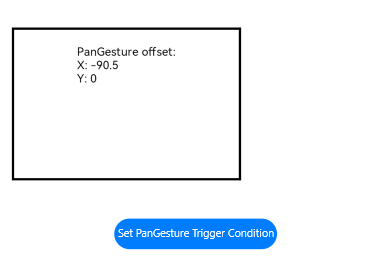
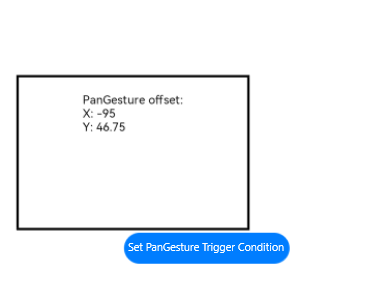
Click **Set PanGesture Trigger Condition** to set the pan gesture to be triggered by two fingers moving toward the lower left corner.