# SegmentButton
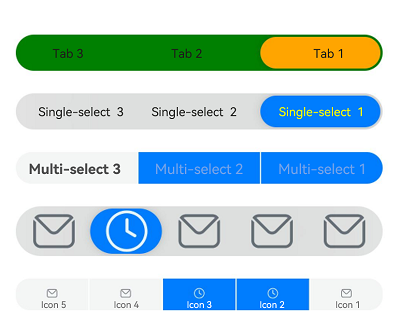
A segment button is a group of options, such as tabs, single-select options, and multi-select options.
>**NOTE**
>
>This component and its child components are supported since API version 11. Updates will be marked with a superscript to indicate their earliest API version.
## Modules to Import
```
import { SegmentButton, SegmentButtonOptions, SegmentButtonItemOptionsArray } from '@kit.ArkUI';
```
## Child Components
Not supported
## SegmentButton
SegmentButton({ options: SegmentButtonOptions, selectedIndexes: number[] })
**Decorator**: @Component
**Atomic service API**: This API can be used in atomic services since API version 12.
**System capability**: SystemCapability.ArkUI.ArkUI.Full
**Parameters**
| Name | Type | Mandatory| Decorator | Description |
| --------------- | --------------------------------------------- | ---- | ----------- | ------------------------------------------------------------ |
| options | [SegmentButtonOptions](#segmentbuttonoptions) | Yes | @ObjectLink | **SegmentButtonOptions** object. |
| selectedIndexes | number[] | Yes | @Link | Indexes of selected options of the segment button. The index starts from 0 and increments by 1.
**NOTE**
**selectedIndexes** is decorated with [@Link](../../../quick-start/arkts-link.md) to implement parent-child two-way synchronization. If no options are selected, an empty array **[]** can be passed in.|
>**NOTE**
>
>The segment button does not support the universal attributes. The segment button takes up the maximum width allowed by the content area, and evenly allocates the width among its options. It adapts its height automatically to the content (text and image), the minimum height being 28 vp.
## SegmentButtonOptions
Provides initial data and custom attributes for the segment button.
### Attributes
**Atomic service API**: This API can be used in atomic services since API version 12.
**System capability**: SystemCapability.ArkUI.ArkUI.Full
| Name | Type | Description |
| ----------------------- | ------------------------------------------------------------ | ------------------------------------------------------------ |
| type | "tab" \| "capsule" | Type of the segment button. |
| multiply | boolean | Whether multiple options can be selected.
**NOTE**
For the segment button consisting of tabs, only one option can be selected. In this case, setting **multiply** to **true** does not take effect.|
| buttons | [SegmentButtonItemOptionsArray](#segmentbuttonitemoptionsarray) | Button information, including the icon and text. |
| fontColor | [ResourceColor](ts-types.md#resourcecolor) | Font color of the option when not selected.
Default value: **#99182431** |
| selectedFontColor | [ResourceColor](ts-types.md#resourcecolor) | Font color of the option when selected.
Default value: **#ff182431** |
| fontSize | [DimensionNoPercentage](#dimensionnopercentage) | Font size of the option when not selected. It cannot be set in percentage.
Default value: **14.0fp**|
| selectedFontSize | [DimensionNoPercentage](#dimensionnopercentage) | Font size of the option when selected. It cannot be set in percentage.
Default value: **14.0fp** |
| fontWeight | [FontWeight](ts-appendix-enums.md#fontweight) | Font weight of the option when not selected.
Default value: **FontWeight.Regular** |
| selectedFontWeight | [FontWeight](ts-appendix-enums.md#fontweight) | Font weight of the option when selected.
Default value: **FontWeight.Medium** |
| backgroundColor | [ResourceColor](ts-types.md#resourcecolor) | Background color.
Default value: **\#0c182431** for tabs and **\#0c182431** for single-select and mult-select options|
| selectedBackgroundColor | [ResourceColor](ts-types.md#resourcecolor) | Background color of the option when selected.
Default value: **\#ffffffff** for tabs and **\#ff007dff** for single-select and multi-select options|
| imageSize | [SizeOptions](ts-types.md#sizeoptions) | Image size.
Default value: { width: 24, height: 24 }
**NOTE**
This attribute is effective only for buttons that contain icons.|
| buttonPadding | [Padding](ts-types.md#padding) \| [Dimension](ts-types.md#dimension10) | Button margin.
Default value: **{ top: 4, right: 8, bottom: 4, left: 8 }** for icon buttons and text buttons, and **{ top: 6, right: 8, bottom: 6, left: 8 }** for icon+text buttons.|
| textPadding | [Padding](ts-types.md#padding) \| [Dimension](ts-types.md#dimension10) | Text padding.
Default value: **0** |
| localizedButtonPadding12+ | [LocalizedPadding](ts-types.md#localizedpadding12) | Button padding.
Default value:
Icon-only buttons and text-only buttons: **{ top: LengthMetrics.vp(4), end: LengthMetrics.vp(8), bottom: LengthMetrics.vp(4), start: LengthMetrics.vp(8) }**
Icon+text buttons: **{ top: LengthMetrics.vp(6), end: LengthMetrics.vp(8), bottom: LengthMetrics.vp(6), start: LengthMetrics.vp(8) }**|
| localizedTextPadding12+ | [LocalizedPadding](ts-types.md#localizedpadding12) | Text margin.
Default value: **0** |
| direction12+ | [Direction](ts-appendix-enums.md#direction) | Layout direction.
Default value: **Direction.Auto** |
| backgroundBlurStyle | [BlurStyle](ts-universal-attributes-background.md#blurstyle9) | Background blur style applied between the content and the background.
Default value: **BlurStyle.NONE** |
### constructor
constructor(options: TabSegmentButtonOptions | CapsuleSegmentButtonOptions)
Implements a constructor.
**Atomic service API**: This API can be used in atomic services since API version 12.
**System capability**: SystemCapability.ArkUI.ArkUI.Full
**Parameters**
| Name | Type | Mandatory| Description |
| ------- | ------------------------------------------------------------ | ---- | -------------------- |
| options | [TabSegmentButtonOptions](#tabsegmentbuttonoptions) \| [CapsuleSegmentButtonOptions](#capsulesegmentbuttonoptions) | Yes| Information about the segment button.|
### tab
static tab(options: TabSegmentButtonConstructionOptions): SegmentButtonOptions
Creates a **SegmentButtonOptions** object for the segment button consisting of tabs.
**Atomic service API**: This API can be used in atomic services since API version 12.
**System capability**: SystemCapability.ArkUI.ArkUI.Full
**Parameters**
| Name | Type | Mandatory| Description |
| ------- | ------------------------------------------------------------ | ---- | -------------------- |
| options | [TabSegmentButtonConstructionOptions](#tabsegmentbuttonconstructionoptions) | Yes | Options of the segment button.|
**Return value**
| Type | Description |
| ------ | ------------------------ |
| [SegmentButtonOptions](#segmentbuttonoptions) | **SegmentButtonOptions** object.|
### capsule
static capsule(options: CapsuleSegmentButtonConstructionOptions): SegmentButtonOptions
Creates a **SegmentButtonOptions** object for the segment button consisting of single-select or multi-select options.
**Atomic service API**: This API can be used in atomic services since API version 12.
**System capability**: SystemCapability.ArkUI.ArkUI.Full
**Parameters**
| Name | Type | Mandatory| Description |
| ------- | ------------------------------------------------------------ | ---- | --------------------------- |
| options | [CapsuleSegmentButtonConstructionOptions](#capsulesegmentbuttonconstructionoptions) | Yes | Options of the segment button.|
**Return value**
| Type | Description |
| ------ | ------------------------ |
| [SegmentButtonOptions](#segmentbuttonoptions) | **SegmentButtonOptions** object.|
## DimensionNoPercentage
Represents the length union type that does not support values in percentage.
**Atomic service API**: This API can be used in atomic services since API version 12.
**System capability**: SystemCapability.ArkUI.ArkUI.Full
| Type | Description |
| -------------------------------- | --------------------------------------------- |
| [PX](ts-types.md#px10) | Length in px. |
| [VP](ts-types.md#vp10) | Length in vp. |
| [FP](ts-types.md#fp10) | Length in fp. |
| [LPX](ts-types.md#lpx10) | Length in lpx.|
| [Resource](ts-types.md#resource) | Resource reference type, which is used to set the value of a component attribute. |
## CommonSegmentButtonOptions
Defines the attributes that can be customized for the segment button.
**Atomic service API**: This API can be used in atomic services since API version 12.
**System capability**: SystemCapability.ArkUI.ArkUI.Full
**Attributes**
| Name | Type | Description |
| ----------------------- | ------------------------------------------------------------ | ------------------------------------------------------------ |
| fontColor | [ResourceColor](ts-types.md#resourcecolor) | Font color of the option when not selected.
Default value: **#99182431** |
| selectedFontColor | [ResourceColor](ts-types.md#resourcecolor) | Font color of the option when selected.
Default value: **#ff182431** |
| fontSize | [DimensionNoPercentage](#dimensionnopercentage) | Font size of the option when not selected. It cannot be set in percentage.
Default value: **14.0fp**|
| selectedFontSize | [DimensionNoPercentage](#dimensionnopercentage) | Font size of the option when selected. It cannot be set in percentage.
Default value: **14.0fp** |
| fontWeight | [FontWeight](ts-appendix-enums.md#fontweight) | Font weight of the option when not selected.
Default value: **FontWeight.Regular** |
| selectedFontWeight | [FontWeight](ts-appendix-enums.md#fontweight) | Font weight of the option when selected.
Default value: **FontWeight.Medium** |
| backgroundColor | [ResourceColor](ts-types.md#resourcecolor) | Background color.
Default value: **\#0c182431** for tabs and **\#0c182431** for single-select and multi-select options|
| selectedBackgroundColor | [ResourceColor](ts-types.md#resourcecolor) | Background color of the option when selected.
Default value: **\#ffffffff** for tabs and **\#ff007dff** for single-select and multi-select options|
| imageSize | [SizeOptions](ts-types.md#sizeoptions) | Image size.
Default value: { width: 24, height: 24 }
**NOTE**
This attribute is effective only for buttons that contain icons.|
| buttonPadding | [Padding](ts-types.md#padding) \| [Dimension](ts-types.md#dimension10) | Button margin.
Default value: **{ top: 4, right: 8, bottom: 4, left: 8 }** for icon buttons and text buttons, and **{ top: 6, right: 8, bottom: 6, left: 8 }** for icon+text buttons.|
| textPadding | [Padding](ts-types.md#padding) \| [Dimension](ts-types.md#dimension10) | Text padding.
Default value: **0** |
| localizedButtonPadding12+ | [LocalizedPadding](ts-types.md#localizedpadding12) | Button padding.
Default value:
Icon-only buttons and text-only buttons: **{ top: LengthMetrics.vp(4), end: LengthMetrics.vp(8), bottom: LengthMetrics.vp(4), start: LengthMetrics.vp(8) }**
Icon+text buttons: **{ top: LengthMetrics.vp(6), end: LengthMetrics.vp(8), bottom: LengthMetrics.vp(6), start: LengthMetrics.vp(8) }**|
| localizedTextPadding12+ | [LocalizedPadding](ts-types.md#localizedpadding12) | Text margin.
Default value: **0** |
| direction12+ | [Direction](ts-appendix-enums.md#direction) | Layout direction.
Default value: **Direction.Auto** |
| backgroundBlurStyle | [BlurStyle](ts-universal-attributes-background.md#blurstyle9) | Background blur style applied between the content and the background.
Default value: **BlurStyle.NONE** |
## TabSegmentButtonConstructionOptions
Represents options for creating a segment button consisting of tabs.
It inherits [CommonSegmentButtonOptions](#commonsegmentbuttonoptions).
**Atomic service API**: This API can be used in atomic services since API version 12.
**System capability**: SystemCapability.ArkUI.ArkUI.Full
| Name | Type | Mandatory| Description |
| ------- | ------------------------------------------------------------ | ---- | ---------- |
| buttons | [ItemRestriction](#itemrestriction)\<[SegmentButtonTextItem](#segmentbuttontextitem)> | Yes | Button information.|
## CapsuleSegmentButtonConstructionOptions
Represents options for creating a segment button consisting of single-select or multi-select options.
It inherits [CommonSegmentButtonOptions](#commonsegmentbuttonoptions).
**Atomic service API**: This API can be used in atomic services since API version 12.
**System capability**: SystemCapability.ArkUI.ArkUI.Full
| Name | Type | Mandatory| Description |
| -------- | ------------------------------------------------- | ---- | ----------------------------- |
| buttons | [SegmentButtonItemTuple](#segmentbuttonitemtuple) | Yes | Button information. |
| multiply | boolean | No | Whether multiple options can be selected.
Default value: **false**|
## ItemRestriction
Represents a tuple used to store button information.
**Atomic service API**: This API can be used in atomic services since API version 12.
| Value | Description |
| ----------------------------------------- | --------------------------------- |
| ItemRestriction\ = [T, T, T?, T?, T?] | A tuple that contains two to five elements of the same type.|
>**NOTE**
>
>A segment button supports two to five options.
## SegmentButtonItemTuple
Represents the tuple union type used to store button information.
**Atomic service API**: This API can be used in atomic services since API version 12.
**System capability**: SystemCapability.ArkUI.ArkUI.Full
| Value | Description |
| ------------------------------------------------------------ | ------------------------- |
| [ItemRestriction](#itemrestriction)\<[SegmentButtonTextItem](#segmentbuttontextitem)\> | A tuple of text-only button information. |
| [ItemRestriction](#itemrestriction)\<[SegmentButtonIconItem](#segmentbuttoniconitem)\> | A tuple of icon-only button information. |
| [ItemRestriction](#itemrestriction)\<[SegmentButtonIconTextItem](#segmentbuttonicontextitem)\> | A tuple of icon and text button information.|
## SegmentButtonItemArray
Represents the array union type used to store button information.
**Atomic service API**: This API can be used in atomic services since API version 12.
**System capability**: SystemCapability.ArkUI.ArkUI.Full
| Value | Description |
| ------------------------------------------------------------ | ------------------------- |
| Array\<[SegmentButtonTextItem](#segmentbuttontextitem)\> | An array of text-only button information. |
| Array\<[SegmentButtonIconItem](#segmentbuttoniconitem)\> | An array of icon-only button information. |
| Array\<[SegmentButtonIconTextItem](#segmentbuttonicontextitem)\> | An array of icon and text button information.|
## SegmentButtonItemOptionsArray
Represents an array for storing button information.
>**NOTE**
>
>A segment button supports two to five options. As such, a **SegmentButtonItemOptionsArray** object stores information about only two to five button options.
### constructor
constructor(elements: SegmentButtonItemTuple)
Implements a constructor.
**Atomic service API**: This API can be used in atomic services since API version 12.
**Parameters**
| Name | Type | Mandatory| Description |
| -------- | ------------------------------------------------- | ---- | ---------- |
| elements | [SegmentButtonItemTuple](#segmentbuttonitemtuple) | Yes | Button information.|
### push
push(...items: SegmentButtonItemArray): number
Adds the specified elements to the end of this array and returns the new length of the array.
**Atomic service API**: This API can be used in atomic services since API version 12.
**Parameters**
| Name | Type | Mandatory| Description |
| ----- | ------------------------------------------------- | ---- | ---------------------- |
| items | [SegmentButtonItemArray](#segmentbuttonitemarray) | Yes | Elements to add to the end of the array.|
**Return value**
| Type | Description |
| ------ | ------------------------ |
| number | Length of the array after the elements are added.|
>**NOTE**
>
>A segment button supports two to five options. As such, a **SegmentButtonItemOptionsArray** object stores information about only two to five button options. If the number limit is reached, this API will not work.
### pop
pop(): SegmentButtonItemOptions | undefined
Removes the last element from this array and returns that element.
**Atomic service API**: This API can be used in atomic services since API version 12.
**Return value**
| Type | Description |
| ------------------------------------------------------------ | -------------- |
| [SegmentButtonItemOptions](#segmentbuttonitemoptions) \| undefined | Element removed from the array.|
>**NOTE**
>
>A segment button supports two to five options. As such, a **SegmentButtonItemOptionsArray** object stores information about only two to five button options. If the number limit is reached, this API will not work.
### shift
shift(): SegmentButtonItemOptions | undefined
Removes the first element from this array and returns that element.
**Atomic service API**: This API can be used in atomic services since API version 12.
**Return value**
| Type | Description |
| ------------------------------------------------------------ | -------------- |
| [SegmentButtonItemOptions](#segmentbuttonitemoptions) \| undefined | Element removed from the array.|
>**NOTE**
>
>A segment button supports two to five options. As such, a **SegmentButtonItemOptionsArray** object stores information about only two to five button options. If the number limit is reached, this API will not work.
### unshift
unshift(...items: SegmentButtonItemArray): number
Adds the specified elements to the beginning of this array and returns the new length of the array.
**Atomic service API**: This API can be used in atomic services since API version 12.
**Parameters**
| Name | Type | Mandatory| Description |
| ----- | ------------------------------------------------- | ---- | -------------------- |
| items | [SegmentButtonItemArray](#segmentbuttonitemarray) | Yes | Elements to add to the beginning of the array.|
**Return value**
| Type | Description |
| ------ | ---------------------- |
| number | Length of the array after the elements are added.|
>**NOTE**
>
>A segment button supports two to five options. As such, a **SegmentButtonItemOptionsArray** object stores information about only two to five button options. If the number limit is reached, this API will not work.
### splice
splice(start: number, deleteCount: number, ...items: SegmentButtonItemOptions[]): SegmentButtonItemOptions[]
Changes the contents of this array by removing the specified number of elements from the specified position and adding new elements in place. This API returns an array containing the removed elements.
**Atomic service API**: This API can be used in atomic services since API version 12.
**Parameters**
| Name | Type | Mandatory| Description |
| ----------- | ------------------------------------------------------- | ---- | -------------------- |
| start | number | Yes | Index of the position starting from which elements are to be removed.|
| deleteCount | number | Yes | Number of elements to remove. |
| items | [SegmentButtonItemOptions](#segmentbuttonitemoptions)[] | No | Elements to add to the array. |
**Return value**
| Type | Description |
| ------------------------------------------------------- | ------------------------------ |
| [SegmentButtonItemOptions](#segmentbuttonitemoptions)[] | An array containing the removed elements.|
>**NOTE**
>
>A segment button supports two to five options. As such, a **SegmentButtonItemOptionsArray** object stores information about only two to five button options. If the number limit is reached, this API will not work.
### create
static create(elements: SegmentButtonItemTuple): SegmentButtonItemOptionsArray
Creates a **SegmentButtonItemOptionsArray** object.
**Atomic service API**: This API can be used in atomic services since API version 12.
**Parameters**
| Name | Type | Mandatory| Description |
| -------- | ------------------------------------------------- | ---- | ---------- |
| elements | [SegmentButtonItemTuple](#segmentbuttonitemtuple) | Yes | Button information.|
**Return value**
| Type | Description |
| ------------------------------------------------------------ | ----------------------------------------- |
| [SegmentButtonItemOptionsArray](#segmentbuttonitemoptionsarray) | Created **SegmentButtonItemOptionsArray** object.|
## TabSegmentButtonOptions
Provides the options of the segment button consisting of tabs. It inherits [TabSegmentButtonConstructionOptions](#tabsegmentbuttonconstructionoptions).
**Atomic service API**: This API can be used in atomic services since API version 12.
**System capability**: SystemCapability.ArkUI.ArkUI.Full
| Name| Type | Description |
| ---- | ----- | ---------------------- |
| type | "tab" | Segment button consisting of tabs.|
## CapsuleSegmentButtonOptions
Provides the options of the segment button consisting of single-select or multi-select options. It inherits [CapsuleSegmentButtonConstructionOptions](#capsulesegmentbuttonconstructionoptions).
**Atomic service API**: This API can be used in atomic services since API version 12.
**System capability**: SystemCapability.ArkUI.ArkUI.Full
| Name| Type | Description |
| ---- | --------- | ----------------------------- |
| type | "capsule" | Segment button consisting of single-select or multi-select options.|
## SegmentButtonTextItem
Provides text button information.
**Atomic service API**: This API can be used in atomic services since API version 12.
**System capability**: SystemCapability.ArkUI.ArkUI.Full
| Name| Type | Mandatory| Description |
| ---- | -------------------------------------- | ---- | ---------- |
| text | [ResourceStr](ts-types.md#resourcestr) | Yes | Button text.|
## SegmentButtonIconItem
Provides icon button information.
**Atomic service API**: This API can be used in atomic services since API version 12.
**System capability**: SystemCapability.ArkUI.ArkUI.Full
| Name | Type | Mandatory| Description |
| ------------ | -------------------------------------- | ---- | -------------------- |
| icon | [ResourceStr](ts-types.md#resourcestr) | Yes | Icon of the option when not selected.|
| selectedIcon | [ResourceStr](ts-types.md#resourcestr) | Yes | Icon of the option when selected. |
>**NOTE**
>
>For the settings to take effect, both **icon** and **selectedIcon** must be set.
## SegmentButtonIconTextItem
Provides icon+text button information.
**Atomic service API**: This API can be used in atomic services since API version 12.
**System capability**: SystemCapability.ArkUI.ArkUI.Full
| Name | Type | Mandatory| Description |
| ------------ | -------------------------------------- | ---- | -------------------- |
| icon | [ResourceStr](ts-types.md#resourcestr) | Yes | Icon of the option when not selected.|
| selectedIcon | [ResourceStr](ts-types.md#resourcestr) | Yes | Icon of the option when selected. |
| text | [ResourceStr](ts-types.md#resourcestr) | Yes | Button text. |
>**NOTE**
>
>For the settings to take effect, both **icon** and **selectedIcon** must be set.
## SegmentButtonItemOptions
Describes options of the segment button.
**Atomic service API**: This API can be used in atomic services since API version 12.
**Attributes**
| Name | Type | Mandatory| Description |
| ------------ | -------------------------------------- | ---- | -------------------- |
| icon | [ResourceStr](ts-types.md#resourcestr) | No | Icon of the option when not selected.|
| selectedIcon | [ResourceStr](ts-types.md#resourcestr) | No | Icon of the option when selected. |
| text | [ResourceStr](ts-types.md#resourcestr) | No | Button text. |
### constructor
constructor(options: SegmentButtonItemOptionsConstructorOptions)
Implements a constructor.
**Atomic service API**: This API can be used in atomic services since API version 12.
**Parameters**
| Name | Type | Mandatory| Description |
| ------- | ------------------------------------------------------------ | ---- | ------------------ |
| options | [SegmentButtonItemOptionsConstructorOptions](#segmentbuttonitemoptionsconstructoroptions) | Yes | Options of the segment button.|
## SegmentButtonItemOptionsConstructorOptions
Describes the constructor parameters of **SegmentButtonItemOptions**.
**Atomic service API**: This API can be used in atomic services since API version 12.
**System capability**: SystemCapability.ArkUI.ArkUI.Full
| Name | Type | Mandatory| Description |
| ------------ | -------------------------------------- | ---- | -------------------- |
| icon | [ResourceStr](ts-types.md#resourcestr) | No | Icon of the option when not selected.|
| selectedIcon | [ResourceStr](ts-types.md#resourcestr) | No | Icon of the option when selected. |
| text | [ResourceStr](ts-types.md#resourcestr) | No | Button text. |
## Example
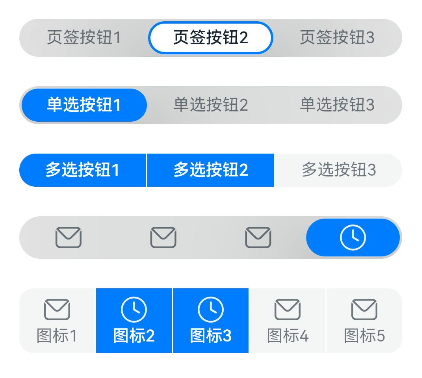
### Example 1
```ts
// xxx.ets
import {
ItemRestriction,
SegmentButton,
SegmentButtonItemTuple,
SegmentButtonOptions,
SegmentButtonTextItem
} from '@kit.ArkUI';
@Entry
@Component
struct Index {
@State tabOptions: SegmentButtonOptions = SegmentButtonOptions.tab({
buttons: [{ text: 'Tab 1' }, { text: 'Tab 2' }, {
text: 'Tab 3'
}] as ItemRestriction,
backgroundBlurStyle: BlurStyle.BACKGROUND_THICK
})
@State singleSelectCapsuleOptions: SegmentButtonOptions = SegmentButtonOptions.capsule({
buttons: [{ text: 'Single-select 1' }, { text: 'Single-select 2' }, { text: 'Single-select 3' }] as SegmentButtonItemTuple,
multiply: false,
backgroundBlurStyle: BlurStyle.BACKGROUND_THICK
})
@State multiplySelectCapsuleOptions: SegmentButtonOptions = SegmentButtonOptions.capsule({
buttons: [{ text: 'Multi-select 1' }, { text: 'Multi-select 2' }, { text: 'Multi-select 3' }] as SegmentButtonItemTuple,
multiply: true
})
@State iconCapsuleOptions: SegmentButtonOptions = SegmentButtonOptions.capsule({
buttons: [
{ icon: $r('sys.media.ohos_ic_public_email'), selectedIcon: $r('sys.media.ohos_ic_public_clock') },
{ icon: $r('sys.media.ohos_ic_public_email'), selectedIcon: $r('sys.media.ohos_ic_public_clock') },
{ icon: $r('sys.media.ohos_ic_public_email'), selectedIcon: $r('sys.media.ohos_ic_public_clock') },
{ icon: $r('sys.media.ohos_ic_public_email'), selectedIcon: $r('sys.media.ohos_ic_public_clock') }
] as SegmentButtonItemTuple,
multiply: false,
backgroundBlurStyle: BlurStyle.BACKGROUND_THICK
})
@State iconTextCapsuleOptions: SegmentButtonOptions = SegmentButtonOptions.capsule({
buttons: [
{ text: 'Icon 1', icon: $r('sys.media.ohos_ic_public_email'), selectedIcon: $r('sys.media.ohos_ic_public_clock') },
{ text: 'Icon 2', icon: $r('sys.media.ohos_ic_public_email'), selectedIcon: $r('sys.media.ohos_ic_public_clock') },
{ text: 'Icon 3', icon: $r('sys.media.ohos_ic_public_email'), selectedIcon: $r('sys.media.ohos_ic_public_clock') },
{ text: 'Icon 4', icon: $r('sys.media.ohos_ic_public_email'), selectedIcon: $r('sys.media.ohos_ic_public_clock') },
{ text: 'Icon 5', icon: $r('sys.media.ohos_ic_public_email'), selectedIcon: $r('sys.media.ohos_ic_public_clock') }
] as SegmentButtonItemTuple,
multiply: true
})
@State tabSelectedIndexes: number[] = [1]
@State singleSelectCapsuleSelectedIndexes: number[] = [0]
@State multiplySelectCapsuleSelectedIndexes: number[] = [0, 1]
@State singleSelectIconCapsuleSelectedIndexes: number[] = [3]
@State multiplySelectIconTextCapsuleSelectedIndexes: number[] = [1, 2]
build() {
Row() {
Column() {
Column({ space: 25 }) {
SegmentButton({ options: this.tabOptions,
selectedIndexes: $tabSelectedIndexes })
SegmentButton({ options: this.singleSelectCapsuleOptions,
selectedIndexes: $singleSelectCapsuleSelectedIndexes })
SegmentButton({
options: this.multiplySelectCapsuleOptions,
selectedIndexes: $multiplySelectCapsuleSelectedIndexes })
SegmentButton({ options: this.iconCapsuleOptions,
selectedIndexes: $singleSelectIconCapsuleSelectedIndexes })
SegmentButton({ options: this.iconTextCapsuleOptions,
selectedIndexes: $multiplySelectIconTextCapsuleSelectedIndexes })
}.width('90%')
}.width('100%')
}.height('100%')
}
}
```
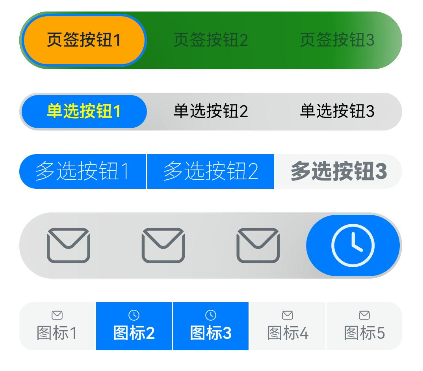
### Example 2
```ts
// xxx.ets
import {
ItemRestriction,
SegmentButton,
SegmentButtonItemTuple,
SegmentButtonOptions,
SegmentButtonTextItem
} from '@kit.ArkUI';
@Entry
@Component
struct Index {
@State tabOptions: SegmentButtonOptions = SegmentButtonOptions.tab({
buttons: [{ text: 'Tab 1' }, { text: 'Tab 2' }, {
text: 'Tab 3'
}] as ItemRestriction,
backgroundColor: Color.Green,
selectedBackgroundColor: Color.Orange,
textPadding: { top: 10, right: 10, bottom: 10, left: 10 },
})
@State singleSelectCapsuleOptions: SegmentButtonOptions = SegmentButtonOptions.capsule({
buttons: [{ text: 'Single-select 1' }, { text: 'Single-select 2' }, { text: 'Single-select 3' }] as SegmentButtonItemTuple,
multiply: false,
fontColor: Color.Black,
selectedFontColor: Color.Yellow,
backgroundBlurStyle: BlurStyle.BACKGROUND_THICK
})
@State multiplySelectCapsuleOptions: SegmentButtonOptions = SegmentButtonOptions.capsule({
buttons: [{ text: 'Multi-select 1' }, { text: 'Multi-select 2' }, { text: 'Multi-select 3' }] as SegmentButtonItemTuple,
multiply: true,
fontSize: 18,
selectedFontSize: 18,
fontWeight: FontWeight.Bolder,
selectedFontWeight: FontWeight.Lighter,
})
@State iconCapsuleOptions: SegmentButtonOptions = SegmentButtonOptions.capsule({
buttons: [
{ icon: $r('sys.media.ohos_ic_public_email'), selectedIcon: $r('sys.media.ohos_ic_public_clock') },
{ icon: $r('sys.media.ohos_ic_public_email'), selectedIcon: $r('sys.media.ohos_ic_public_clock') },
{ icon: $r('sys.media.ohos_ic_public_email'), selectedIcon: $r('sys.media.ohos_ic_public_clock') },
{ icon: $r('sys.media.ohos_ic_public_email'), selectedIcon: $r('sys.media.ohos_ic_public_clock') }
] as SegmentButtonItemTuple,
multiply: false,
imageSize: { width: 40, height: 40 },
buttonPadding: { top: 6, right: 10, bottom: 6, left: 10 },
backgroundBlurStyle: BlurStyle.BACKGROUND_THICK
})
@State iconTextCapsuleOptions: SegmentButtonOptions = SegmentButtonOptions.capsule({
buttons: [
{ text: 'Icon 1', icon: $r('sys.media.ohos_ic_public_email'), selectedIcon: $r('sys.media.ohos_ic_public_clock') },
{ text: 'Icon 2', icon: $r('sys.media.ohos_ic_public_email'), selectedIcon: $r('sys.media.ohos_ic_public_clock') },
{ text: 'Icon 3', icon: $r('sys.media.ohos_ic_public_email'), selectedIcon: $r('sys.media.ohos_ic_public_clock') },
{ text: 'Icon 4', icon: $r('sys.media.ohos_ic_public_email'), selectedIcon: $r('sys.media.ohos_ic_public_clock') },
{ text: 'Icon 5', icon: $r('sys.media.ohos_ic_public_email'), selectedIcon: $r('sys.media.ohos_ic_public_clock') }
] as SegmentButtonItemTuple,
multiply: true,
imageSize: { width: 10, height: 10 },
})
@State tabSelectedIndexes: number[] = [0]
@State singleSelectCapsuleSelectedIndexes: number[] = [0]
@State multiplySelectCapsuleSelectedIndexes: number[] = [0, 1]
@State singleSelectIconCapsuleSelectedIndexes: number[] = [3]
@State multiplySelectIconTextCapsuleSelectedIndexes: number[] = [1, 2]
build() {
Row() {
Column() {
Column({ space: 20 }) {
SegmentButton({ options: this.tabOptions, selectedIndexes: $tabSelectedIndexes })
SegmentButton({ options: this.singleSelectCapsuleOptions,
selectedIndexes: $singleSelectCapsuleSelectedIndexes })
SegmentButton({ options: this.multiplySelectCapsuleOptions,
selectedIndexes: $multiplySelectCapsuleSelectedIndexes })
SegmentButton({ options: this.iconCapsuleOptions,
selectedIndexes: $singleSelectIconCapsuleSelectedIndexes })
SegmentButton({ options: this.iconTextCapsuleOptions,
selectedIndexes: $multiplySelectIconTextCapsuleSelectedIndexes })
}.width('90%')
}.width('100%')
}.height('100%')
}
}
```
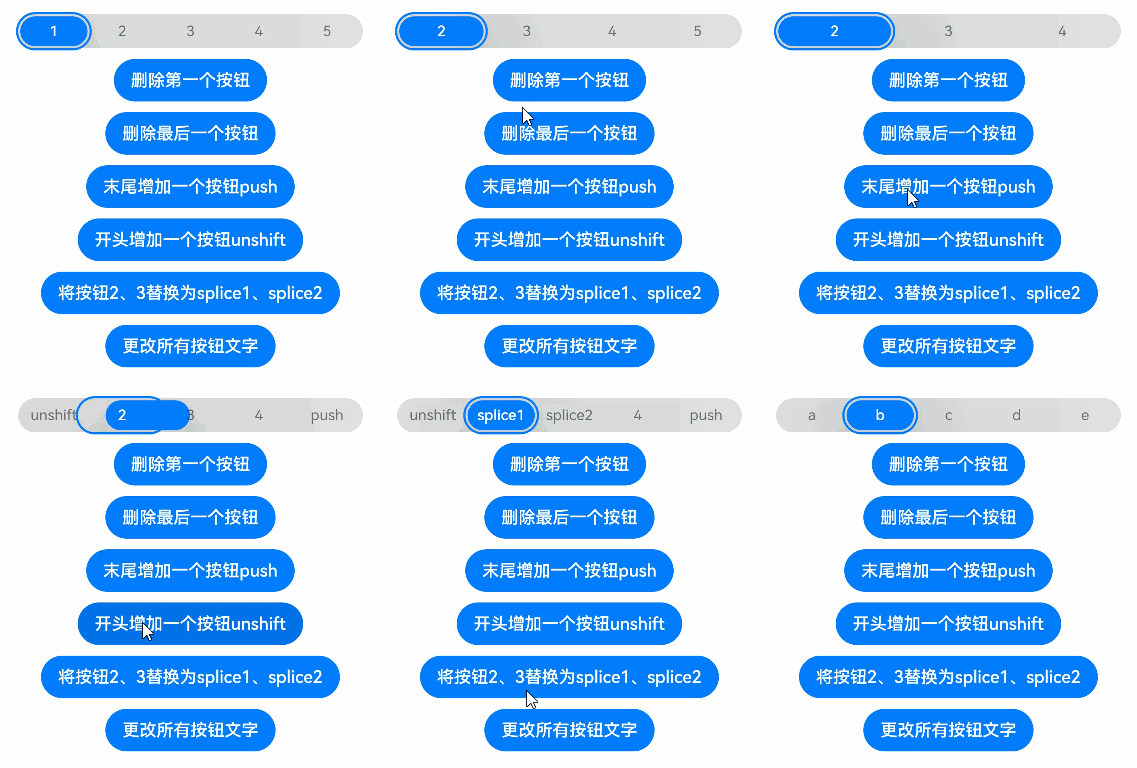
### Example 3
```ts
import {
SegmentButton,
SegmentButtonOptions,
SegmentButtonItemOptionsArray,
SegmentButtonItemTuple,
SegmentButtonItemOptions
} from '@kit.ArkUI';
@Entry
@Component
struct Index {
@State singleSelectCapsuleOptions: SegmentButtonOptions = SegmentButtonOptions.capsule({
buttons: [{ text: '1' }, { text: '2' }, { text: '3' },
{ text: '4' }, { text: '5' }] as SegmentButtonItemTuple,
multiply: false,
backgroundBlurStyle: BlurStyle.BACKGROUND_THICK
})
@State capsuleSelectedIndexes: number[] = [0]
build() {
Row() {
Column() {
Column({ space: 10 }) {
SegmentButton({ options: this.singleSelectCapsuleOptions,
selectedIndexes: $capsuleSelectedIndexes })
Button ("Delete First Option")
.onClick(() => {
this.singleSelectCapsuleOptions.buttons.shift()
})
Button ("Delete Last Option")
.onClick(() => {
this.singleSelectCapsuleOptions.buttons.pop()
})
Button ("Add push to End")
.onClick(() => {
this.singleSelectCapsuleOptions.buttons.push({ text: 'push' })
})
Button ("Add unshift to Beginning")
.onClick(() => {
this.singleSelectCapsuleOptions.buttons.unshift(({ text: 'unshift' }))
})
Button ("Replace Options 2 and 3 with splice1 and splice2")
.onClick(() => {
this.singleSelectCapsuleOptions.buttons.splice(1, 2, new SegmentButtonItemOptions({
text: 'splice1'
}), new SegmentButtonItemOptions({ text: 'splice2' }))
})
Button ("Change All Button Text")
.onClick(() => {
this.singleSelectCapsuleOptions.buttons =
SegmentButtonItemOptionsArray.create([{ text: 'a' }, { text: 'b' },
{ text: 'c' }, { text: 'd' }, { text: 'e' }])
})
}.width('90%')
}.width('100%')
}.height('100%')
}
}
```
### Example 4
This example shows a mirrored layout of segment buttons.
```ts
// xxx.ets
import { LengthMetrics, SegmentButton, SegmentButtonOptions } from '@kit.ArkUI'
@Entry
@Component
struct Index {
@State tabOptions: SegmentButtonOptions = SegmentButtonOptions.tab({
buttons: [{ text: 'Tab 1' }, { text: 'Tab 2' }, {
text: 'Tab 3'
}],
direction: Direction.Rtl,
backgroundColor: Color.Green,
selectedBackgroundColor: Color.Orange,
localizedTextPadding: {
end: LengthMetrics.vp(10),
start: LengthMetrics.vp(10)
},
})
@State singleSelectCapsuleOptions: SegmentButtonOptions = SegmentButtonOptions.capsule({
buttons: [{ text: 'Single-select 1' }, { text: 'Single-select 2' }, { text: 'Single-select 3' }],
multiply: false,
direction: Direction.Rtl,
fontColor: Color.Black,
selectedFontColor: Color.Yellow,
backgroundBlurStyle: BlurStyle.BACKGROUND_THICK
})
@State multiplySelectCapsuleOptions: SegmentButtonOptions = SegmentButtonOptions.capsule({
buttons: [{ text: 'Multi-select 1' }, { text: 'Multi-select 2' }, { text: 'Multi-select 3' }],
multiply: true,
direction: Direction.Rtl,
fontSize: 18,
selectedFontSize: 18,
fontWeight: FontWeight.Bolder,
selectedFontWeight: FontWeight.Lighter,
})
@State iconCapsuleOptions: SegmentButtonOptions = SegmentButtonOptions.capsule({
buttons: [
{ icon: $r('sys.media.ohos_ic_public_email'), selectedIcon: $r('sys.media.ohos_ic_public_clock') },
{ icon: $r('sys.media.ohos_ic_public_email'), selectedIcon: $r('sys.media.ohos_ic_public_clock') },
{ icon: $r('sys.media.ohos_ic_public_email'), selectedIcon: $r('sys.media.ohos_ic_public_clock') },
{ icon: $r('sys.media.ohos_ic_public_email'), selectedIcon: $r('sys.media.ohos_ic_public_clock') },
{ icon: $r('sys.media.ohos_ic_public_email'), selectedIcon: $r('sys.media.ohos_ic_public_clock') }
],
multiply: false,
direction: Direction.Rtl,
imageSize: { width: 40, height: 40 },
localizedButtonPadding: {
end: LengthMetrics.vp(10),
start: LengthMetrics.vp(10)
},
backgroundBlurStyle: BlurStyle.BACKGROUND_THICK
})
@State iconTextCapsuleOptions: SegmentButtonOptions = SegmentButtonOptions.capsule({
buttons: [
{ text: 'Icon 1', icon: $r('sys.media.ohos_ic_public_email'), selectedIcon: $r('sys.media.ohos_ic_public_clock') },
{ text: 'Icon 2', icon: $r('sys.media.ohos_ic_public_email'), selectedIcon: $r('sys.media.ohos_ic_public_clock') },
{ text: 'Icon 3', icon: $r('sys.media.ohos_ic_public_email'), selectedIcon: $r('sys.media.ohos_ic_public_clock') },
{ text: 'Icon 4', icon: $r('sys.media.ohos_ic_public_email'), selectedIcon: $r('sys.media.ohos_ic_public_clock') },
{ text: 'Icon 5', icon: $r('sys.media.ohos_ic_public_email'), selectedIcon: $r('sys.media.ohos_ic_public_clock') }
],
multiply: true,
direction: Direction.Rtl,
imageSize: { width: 10, height: 10 },
})
@State tabSelectedIndexes: number[] = [0]
@State singleSelectCapsuleSelectedIndexes: number[] = [0]
@State multiplySelectCapsuleSelectedIndexes: number[] = [0, 1]
@State singleSelectIconCapsuleSelectedIndexes: number[] = [3]
@State multiplySelectIconTextCapsuleSelectedIndexes: number[] = [1, 2]
build() {
Row() {
Column() {
Column({ space: 20 }) {
SegmentButton({ options: this.tabOptions, selectedIndexes: $tabSelectedIndexes })
SegmentButton({
options: this.singleSelectCapsuleOptions,
selectedIndexes: $singleSelectCapsuleSelectedIndexes
})
SegmentButton({
options: this.multiplySelectCapsuleOptions,
selectedIndexes: $multiplySelectCapsuleSelectedIndexes
})
SegmentButton({
options: this.iconCapsuleOptions,
selectedIndexes: $singleSelectIconCapsuleSelectedIndexes
})
SegmentButton({
options: this.iconTextCapsuleOptions,
selectedIndexes: $multiplySelectIconTextCapsuleSelectedIndexes
})
}.width('90%')
}.width('100%')
}.height('100%')
}
}
```