# Code Obfuscation
## Overview
Source code obfuscation helps reduce the risk of application hacking as well as the application package size by shortening class names and member names.
Originally, the code obfuscation function was enabled by default in DevEco Studio. For a project developed on the stage model of API version 10 or later, code obfuscation was automatically performed on parameter names and local variable names when the [build mode is release](#usage-description).
Since DevEco Studio 5.0.3.600, code obfuscation is disabled by default for new projects. If code obfuscation is enabled in the **build-profile.json5** file of the module, four options are enabled by default in the **obfuscation-rules.txt** file: **-enable-property-obfuscation**, **-enable-toplevel-obfuscation**, **-enable-filename-obfuscation**, and **-enable-export-obfuscation**. You can modify the configuration in this file.
### Constraints
* Only the projects developed on the stage model are supported.
* The build mode of the project is release.
* The **disable-obfuscation** option is not configured for the module and the HAR on which the module depends.
### Code Obfuscation Scope
In a project, the following files can be obfuscated, and the cache files after obfuscation are stored in **build/[...]/release** in the module directory.
* ArkTS files
* TS files
* JS files
## Enabling Code Obfuscation
Code obfuscation has been integrated into the system and can be enabled for use in DevEco Studio.
Currently, only name obfuscation is provided. Other obfuscation capabilities deteriorate performance. You can use code obfuscation to obfuscate the following names:
* Parameter names and local variable names
* Top-level scope names
* Property names
* Exported names
* File names
After code obfuscation is enabled, parameter names and local variable names will be obfuscated by default. No option needs to be configured. Obfuscation of top-level scope name, property names, exported names, and file names may cause runtime errors. You can enable or disable these obfuscation capabilities by configuring obfuscate options.
When a project is created, the following content is automatically generated in the **build-profile.json5** file:
```
"arkOptions": {
"obfuscation": {
"ruleOptions": {
"enable": true,
"files": ["./obfuscation-rules.txt"],
}
}
}
```
When a library is created, the **consumerFiles** field is automatically generated in addition to the preceding content.
```
"arkOptions": {
"obfuscation": {
"ruleOptions": {
"enable": true,
"files": ["./obfuscation-rules.txt"],
}
"consumerFiles": ["./consumer-rules.txt"]
}
}
```
If you disable code obfuscation and then want to enable it again, the value of **ruleOptions.enable** must be **true**.
The obfuscation configuration files specified in the **ruleOptions.files** field take effect when the HAP, HSP, or HAR is built.
The obfuscation configuration files specified in the **consumerFiles** field take effect when the module that depends on the library is built. The contents of these obfuscation configuration files are also merged into the **obfuscation.txt** file in the HAR.
During the build of the HAP, HSP, or HAR, the final obfuscation rules are the combination of the **ruleOptions.files** field of the current module, the **consumerFiles** field of the dependent library, and the **obfuscation.txt** file in the dependent HAR.
During HAR build, the **obfuscation.txt** file in the HAR contains the combination of the **consumerFiles** field of the current HAR, the **consumerFiles** field of the dependent library, and the **obfuscation.txt** file in the dependent HAR. No **obfuscation.txt** file is generated during HAP or HSP build. For details about the merge policy, see [Obfuscation Rule Merge Policy](#obfuscation-rule-merge-policy).
**Reminder of Rule Changes**
Since DevEco Studio 5.0.3.600, code obfuscation is disabled by default (**"enable": false**) for a new project. In the **obfuscation-rules.txt** file, **-enable-property-obfuscation**, **-enable-toplevel-obfuscation**, **-enable-filename-obfuscation**, and **-enable-export-obfuscation** are enabled by default. Enabling the four options may cause the application to crash at runtime. You are advised to read [Troubleshooting](#troubleshooting) to rectify the fault.
### Obfuscation Rule Configuration File
During the creation of a project or library, DevEco Studio automatically generates the **obfuscation-rules.txt** and **consumer-rules.txt** files. You can write obfuscation rules into these files or other user-defined files, and then add the file paths in **ruleOptions.files** and **consumerFiles**, as shown in the following example.
```
"buildOption": {
"arkOptions": {
"obfuscation": {
"ruleOptions": {
"enable": true,
"files": ["./obfuscation-rules.txt", "./myrules.txt"], // Place myrules.txt in the same directory as the build-profile.json5 file.
}
"consumerFiles": ["./consumer-rules.txt", "./my-consumer-rules.txt"]
}
}
}
```
## Configuring Obfuscation Rules
There are two types of obfuscation rules: [obfuscate options](#obfuscate-options) and [keep options](#keep-options). The former provides a switch for multiple obfuscation capabilities, such as obfuscation of top-level scope names, property names, and file names. The latter provides the trustlist configuration of various obfuscation capabilities.
**NOTE**
Any modification to the obfuscation configuration takes effect only after a full build of the application.
### Obfuscate Options
#### -disable-obfuscation
Disables code obfuscation. If this option is used, the built HAP, HSP, or HAR is not obfuscated.
#### -enable-property-obfuscation
Enables property obfuscation. If this option is used, all property names except the following are obfuscated:
* Property names of classes and objects that are directly imported or exported by using the **import** or **export** statement. For example, the property name **data** in the following example is not obfuscated.
```
export class MyClass {
data: string;
}
```
* Property names in ArkUI components. For example, **message** and **data** in the following example are not obfuscated.
```
@Component struct MyExample {
@State message: string = "hello";
data: number[] = [];
...
}
```
* Property names specified by [keep options](#keep-options).
* Property names in the SDK API list. The SDK API list is a name set automatically extracted from the SDK during build. The cache file is **systemApiCache.json**, which is stored in **build/default/cache/{...}/release/obfuscation** in the project directory.
* String literal property names. For example, **"name"** and **"age"** in the following example are not obfuscated.
```
let person = {"name": "abc"};
person["age"] = 22;
```
If you want to obfuscate the string literal property name, use the **-enable-string-property-obfuscation** option in addition to the current option, as follows:
```
-enable-property-obfuscation
-enable-string-property-obfuscation
```
**NOTE**
* If a string literal property name in the code contains special characters, for example, **let obj = {"\n": 123, "": 4, " ": 5}**, you are advised not to use the **-enable-string-property-obfuscation** option because these names may fail to be kept using [keep options](#keep-options). Special characters refer to characters other than lowercase letters a-z, uppercase letters A-Z, digits 0-9, and underscores (_).
* The property trustlist of the SDK API list does not contain the string constants used in the declaration file. For example, the string **'ohos.want.action.home'** in the example is not included in the property trustlist.
```
// Part of the SDK API file @ohos.app.ability.wantConstant:
export enum Params {
ACTION_HOME = 'ohos.want.action.home'
}
// Source code example:
let params = obj['ohos.want.action.home'];
```
When the **-enable-string-property-obfuscation** option is used, use the keep option if you want to keep the property names of the SDK API string constants used in the source code, for example, **obj['ohos.want.action.home']**.
#### -enable-toplevel-obfuscation
Enables top-level scope name obfuscation. If this option is used, all names of all top-level scopes except the following are obfuscated:
* Top-level scope names imported or exported using the **import** or **export** statement.
* Top-level scope names that are not declared in the current file.
* Top-level scope names specified by [keep options](#keep-options).
* Top-level scope names in the SDK API list.
#### -enable-filename-obfuscation
Enables file or folder name obfuscation. If this option is used, all file or folder names except the following are obfuscated:
* File or folder names specified by the **main** and **types** fields in the **oh-package.json5** file.
* File or folder names specified by the **srcEntry** field in the **module.json5** file of the module.
* File or folder names specified by [-keep-file-name](#keep-options).
* File or folder names in non-ECMAScript module reference mode. An ECMAScript module example is **import {foo} from './filename'**.
* File or folder names in non-path reference mode. For example, **json5** in the example **import module from 'json5'** is not obfuscated.
**NOTE**
The system loads certain files during application running. For these files, manually configure a trustlist in the [`-keep-file-name`] option to prevent them from being obfuscated. Otherwise, the application may fail to run.
In the following scenarios, you need to manually configure a trustlist:
* The module contains an ability component. In this case, add all paths configured for **srcEntry** under the **abilities** field in **src/main/module.json5** to the trustlist.
* The module contains the multithreading service: Worker. In this case, add all paths under the **buildOption'-'sourceOption'-'workers'** field in **build-profiles.json5** to the trustlist.
**Reminder**
The names of the compilation entry file, ability component file, and worker multithreaded file cannot be obfuscated and have been automatically added to the trustlist in DevEco Studio 5.0.3.500. No manual configuration is required. For other files that cannot be obfuscated, you need to manually configure their names in the trustlist.
#### -enable-export-obfuscation
Enables obfuscation for names of classes or objects that are directly imported or exported and their property names. If this option is used, the names directly imported or exported in the module are obfuscated, except the following:
* Names of classes or objects exported from remote HARs (packages whose real paths are in oh_modules) and their property names.
* Names and property names specified by [keep options](#keep-options).
* Names in the SDK API list.
**NOTE**
- To obfuscate property names in imported or exported classes, use both the **-enable-property-obfuscation** and **-enable-export-obfuscation** options.
- If the **-enable-export-obfuscation** option is used during HSP build, the externally exposed interfaces must be kept in the **obfuscation-rules.txt** file of the module.
- During the build of an HAP, an HSP, and an HSP-dependent HAR, if the **-enable-export-obfuscation** option is used, the interfaces imported from the HSP must be kept in the **obfuscation-rules.txt** file in the module.
```
// Code example (entry file Index.ets in the HSP):
export { add, customApiName } from './src/main/ets/utils/Calc'
// Example of keeping an interface name:
// Configuration of the obfuscation-rules.txt file in the HSP and modules that depend on the HSP:
-keep-global-name
add
customApiName
```
#### -compact
Removes unnecessary spaces and all line feeds. If this option is used, all code is compressed to one line.
**NOTE**
The stack information built in release mode contains the line number of code, but not the column number. Therefore, when the **compact** option is used, the source code cannot be located based on the line number in the stack information.
#### -remove-log
Removes the expressions involving direct calls to the **console.** statement in the following scenarios:
- Calls at the top layer of a file.
- Calls within a code block.
- Calls within a module.
- Calls within a switch statement.
#### -print-namecache *filepath*
Saves the name cache to the specified file path. The name cache contains mappings before and after name obfuscation.
**NOTE**
A new **namecache.json** file is generated each time the module if fully built. Save a copy of the file each time you publish a new version.
#### -apply-namecache *filepath*
Reuses the specified name cache file. The names will be obfuscated according to the cache mappings. If there is no corresponding name, a new random segment name is used.
This option should be used in incremental build scenarios.
By default, DevEco Studio saves cache files in a temporary cache directory and automatically applies the cache files during incremental build.
Cache Directory: **build/default/cache/{...}/release/obfuscation**
#### -remove-comments
Removes JsDoc comments from the declaration file generated after compilation.
**NOTE**
By default, all comments in the source code file generated after the build are removed and cannot be kept.
You can configure **keep-comments** to keep the JsDoc comments in the declaration file from being obfuscated.
#### -print-kept-names *filepath*
Prints the keep-name list and full trustlist. The **filepath** parameter is optional.
If the **filepath** parameter is not specified, the keep-name list (**keptNames.json**) and full trustlist (**whitelist.json**) are output to the cache directory **build/default/cache/{...}/release/obfuscation** by default.
If the **filepath** parameter is specified, the keep-name list is also exported to the path specified by this parameter. The file path specified must be a relative path, which starts from the directory where the obfuscation configuration file is currently located. The file name extension in the file path must be .json.
The full trustlist (**whitelist.json**) contains all trustlists collected during module compilation. It is classified into the following types:
(1) 'sdk': system APIs.
(2) 'lang': keywords in the language.
(3) 'conf': trustlist in the user-defined keep options.
(4) 'struct': properties in ArkUI structs.
(5) 'export': names and properties exported.
(6) 'strProp': string properties.
(7) 'enum': members in enums (available only during the compilation of the HAR module).
The **keptNames.json** file contains the names that are not obfuscated and the reasons why they are not obfuscated. There are seven reasons: The name is the same as that in the SDK trustlist, language trustlist, user-defined trustlist, struct trustlist, exported name trustlist, or string property trustlist (when string property obfuscation is disabled), or enum trustlist (during HAR module compilation).
### Keep Options
#### -keep-property-name *[,identifiers,...]*
Keeps the specified property names from being obfuscated. Name wildcards are supported. An example is as follows.
```
-keep-property-name
age
firstName
lastName
```
**NOTE**
This option takes effect when **-enable-property-obfuscation** is used.
What property names should be kept?
For safety, you are advised to keep all properties that are not accessed through dot notation.
Example:
```
var obj = {x0: 0, x1: 0, x2: 0};
for (var i = 0; i <= 2; i++) {
console.log(obj['x' + i]); // x0, x1, and x2 should be kept.
}
Object.defineProperty(obj, 'y', {}); // y should be kept.
console.log(obj.y);
obj.s = 0;
let key = 's';
console.log(obj[key]); // s should be kept.
obj.u = 0;
console.log(obj.u); // u can be correctly obfuscated.
obj.t = 0;
console.log(obj['t']); // When obfuscation of string literal property names is enabled, both t and 't' can be correctly obfuscated. However, it is recommended that 't' be kept.
obj['v'] = 0;
console.log(obj['v']); // When obfuscation of string literal property names is enabled, 'v' can be correctly obfuscated. However, it is recommended that 'v' be kept.
```
In the case of indirect exports, for example, **export MyClass** and **let a = MyClass; export {a}**, if you do not want to obfuscate property names, use [keep options](#keep-options) to keep them. For property names of directly exported classes or objects, such as **name** and **age** in the following example, if you do not want to obfuscate them, use [keep options](#keep-options) to keep them.
```
export class MyClass {
person = {name: "123", age: 100};
}
```
If an API (for example, **foo** in the example) of the .so library needs to be used in the ArkTS/TS/JS file, manually keep the API name.
```
import testNapi from 'library.so'
testNapi.foo() // foo should be kept. Example: -keep-property-name foo
```
Manually keep the fields used in JSON files.
```
const jsonData = ('./1.json')
let jsonStr = JSON.parse(jsonData)
let jsonObj = jsonStr.jsonProperty // jsonProperty should be kept.
```
Manually keep database-related fields.
```
const dataToInsert = {
value1: 'example1', // value1 should be kept.
};
```
#### -keep-global-name *[,identifiers,...]*
Keep the top-level scope names from being obfuscated. Name wildcards are supported. Example:
```
-keep-global-name
Person
printPersonName
```
What top-level scope names should be kept?
In JavaScript, variables in the top-level scope are properties of **globalThis**. If **globalThis** is used to access a global variable in the code, the variable name should be kept.
Example:
```
var a = 0;
console.log(globalThis.a); // a should be kept.
function foo(){}
globalThis.foo(); // foo should be kept.
var c = 0;
console.log(c); // c can be correctly obfuscated.
function bar(){}
bar(); // bar can be correctly obfuscated.
class MyClass {}
let d = new MyClass(); // MyClass can be correctly obfuscated.
```
#### -keep-file-name *[,identifiers,...]*
Keeps the file or folder names from being obfuscated. You do not need to specify the file name extension. Name wildcards are supported. Example:
```
-keep-file-name
index
entry
```
What file names should be kept?
```
const module1 = require('./file1') // ArkTS does not support CommonJS. Therefore, the path reference should be kept.
const moduleName = './file2'
const module2 = import(moduleName) // In dynamic reference mode, it cannot tell whether moduleName is a path. Therefore, the module name should be kept.
```
#### -keep-comments *[,identifiers,...]*
Keeps the classes, functions, namespaces, enums, structs, interfaces, modules, types, and JsDoc comments above properties in the declaration file generated after compilation from being obfuscated. Name wildcards are supported. For example, to keep the JSDoc comments above the **Human** class in the declaration file, use the following configuration:
```
-keep-comments
Human
```
**NOTE**
- This option takes effect when **-remove-comments** is used.
- If the classes, functions, namespaces, enums, structs, interfaces, modules, types, and property names in the declaration file generated after compilation are confused, the JsDoc comments above the element cannot be kept using **-keep-comments**. For example, when **exportClass** is configured in **-keep-comments**, if the class name is **exportClass** obfuscated, its JSDoc comments cannot be kept:
```
/*
* @class exportClass
*/
export class exportClass {}
```
#### -keep-dts *filepath*
Keeps the names in the .d.ts file in the specified absolute path from being obfuscated. The file path can be a directory. In this case, the names in all .d.ts files in the specified directory are kept.
#### -keep *filepath*
Keeps all names (such as variable names, class names, and property names) in the specified relative path from being obfuscated. The path can be a file or directory. If the path is a directory, the files in the directory and subdirectories are not obfuscated.
The path must be a relative path. **./** and **../** are relative to the directory where the obfuscation configuration file is located. Path wildcards are supported.
```
-keep
./src/main/ets/fileName.ts // Names in the fileName.ts file are not obfuscated.
../folder // Names in all the files under the folder directory and its subdirectories are not obfuscated.
../oh_modules/json5 // Names in all the files in the imported third-party library json5 are not obfuscated.
```
**NOTE**
This option does not affect the capability provided by the **-enable-filename-obfuscation** option.
#### Wildcards Supported by Keep Options
##### Name Wildcards
The table below lists the name wildcards supported.
| Wildcard| Description | Example |
| ------ | ---------------------- | ------------------------------------------ |
| ? | Matches any single character. | "AB?" matches "ABC", but not "AB". |
| \* | Matches any number of characters.| "\*AB\*" matches "AB", "aABb", "cAB", and "ABc".|
**Use Example**
Keep all property names that start with **a**.
```
-keep-property-name
a*
```
Keep all single-character property names.
```
-keep-property-name
?
```
Keep all property names.
```
-keep-property-name
*
```
##### Path Wildcards
The table below lists the path wildcards supported.
| Wildcard| Description | Example |
| ------ | ------------------------------------------------------------------------ | ------------------------------------------------- |
| ? | Matches any single character except the path separator (/). | "../a?" matches "../ab", but not "../a/". |
| \* | Matches any number of characters except the path separator (/). | "../a*/c" matches "../ab/c", but not "../ab/d/s/c".|
| \*\* | Matches any number of characters. | "../a**/c" matches "../ab/c" and "../ab/d/s/c". |
| ! | Negation. It can only be placed at the beginning of a path to exclude a certain case configured in the trustlist.| "!../a/b/c.ets" indicates all paths other than "../a/b/c.ets". |
**Use Example**
Keep the **c.ets** file in the **../a/b/** directory (excluding subdirectories).
```
-keep
../a/b/*/c.ets
```
Keep the **c.ets** file in the **../a/b/** directory and its subdirectories.
```
-keep
../a/b/**/c.ets
```
Keep all files except the **c.ets** file in the **../a/b/** directory. The exclamation mark (!) cannot be used alone. It can only be used to exclude existing cases in the trustlist.
```
-keep
../a/b/
!../a/b/c.ets
```
Keep all the files in the **../a/** directory (excluding subdirectories).
```
-keep
../a/*
```
Keep all the files in the **../a/** directory and its subdirectories.
```
-keep
../a/**
```
Keep all the files in the module.
```
-keep
./**
```
**NOTE**
- In these options, the wildcards *, ?, and ! cannot be used for other meanings.
Example:
```
class A {
'*'= 1
}
-keep-property-name
*
```
In this example, * indicates any number of characters, and all property names are kept (not obfuscated). It does not mean that only the * property is kept.
- In the **-keep** option, only the path format / is allowed. The path format \ or \\ is not.
### Comments
You can use **#** to comment out an obfuscation rule file. The line that starts with **#** is treated as a comment.
Example:
```
# white list for MainAbility.ets
-keep-global-name
MyComponent
GlobalFunction
-keep-property-name # white list for dynamic property names
firstName
lastName
age
```
During HAR build, comments are not merged into the final **obfuscation.txt** file.
### Obfuscation Rule Merge Policy
A project often has many obfuscation rule files, which are:
* **ruleOptions.files** of the main project (the project being built)
* File specified by the **consumerFiles** field in the local dependent libraries
* **obfuscation.txt** file in remote dependent HARs
When the main project is built, the obfuscation rules in these files are merged according to the following policy (in pseudo code):
```
let `listRules` indicates the list of all obfuscation rule files mentioned above.
let finalRule = {
disableObfuscation: false,
enablePropertyObfuscation: false,
enableToplevelObfuscation: false,
compact: false,
removeLog: false,
keepPropertyName: [],
keepGlobalName: [],
keepDts: [],
printNamecache: string,
applyNamecache: string
}
for each file in `listRules`:
for each option in file:
switch(option) {
case -disable-obfuscation:
finalRule.disableObfuscation = true;
continue;
case -enable-property-obfuscation:
finalRule.enablePropertyObfuscation = true;
continue;
case -enable-toplevel-obfuscation:
finalRule.enableToplevelObfuscation = true;
continue;
case -compact:
finalRule.compact = true;
continue;
case -remove-log:
finalRule.removeLog = true;
continue;
case -print-namecache:
finalRule.printNamecache = #{specifiedPathName};
continue;
case -apply-namecache:
finalRule.applyNamecache = #{specifiedPathName};
continue;
case -keep-property-name:
finalRule.keepPropertyName.push(#{specifiedName});
continue;
case -keep-global-name:
finalRule.keepGlobalName.push(#{specifiedName});
continue;
case -keep-dts:
finalRule.keepDts.push(#{specifiedPath});
continue;
}
end-for
end-for
```
The final obfuscation rule comes from the object **finalRule**.
During HAR build, the final **obfuscation.txt** file comes from the combination of the **consumerFiles** field of the main project and the local dependent libraries, and the **obfuscation.txt** file of the dependent HARs. The merge policy is the same as the preceding one except for the following differences:
* The options **-keep-global-name** and **-keep-property-name** are used instead of **-keep-dts**.
* The **-print-namecache** and **apply-namecache** options are ignored and will not appear in the final **obfuscation.txt** file.
## Retracing Stack Traces
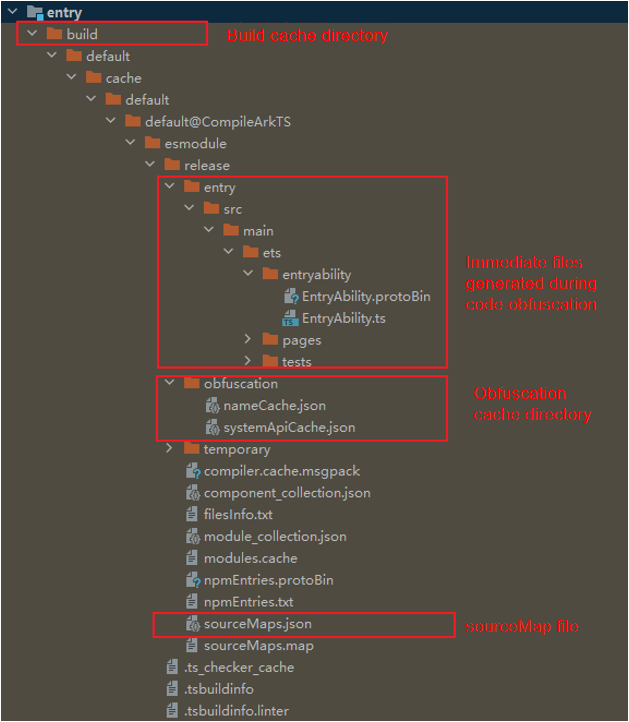
The function names of an application project after obfuscation are changed. As a result, the stack trace printed during crash is more difficult to understand because it is not completely consistent with the source code. You can use the hstack plugin in DevEco Studio Command Line Tools to restore the source stack trace and analyze problems. The **sourceMap.json** file generated during compilation and the obfuscation name mapping file **nameCache.json** are essential for de-obfuscation. Ensure to back them up locally.
## Usage Description
* Currently, custom obfuscation plugins cannot be inserted into the hvigor build process.
* If a module that depends on an obfuscated HAR enables obfuscation, the HAR will be obfuscated again.
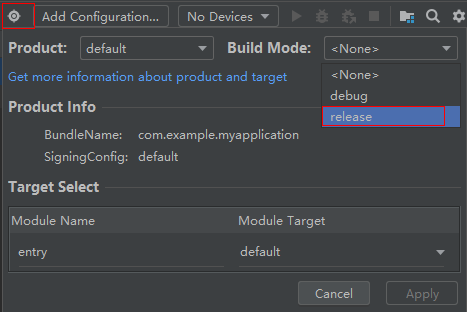
* To enable the release build mode, select **Product** in the upper right corner of DevEco Studio and set **Build Mode** to **release**.
## Appendix
### Mappings Between Obfuscate Options and Minimum SDK Versions
| Obfuscate Option| Description | Minimum SDK Version|
| ------- | --------- | ------ |
| -disable-obfuscation | Disables obfuscation.| 4.0.9.2 |
| -enable-property-obfuscation | Enables property obfuscation.| 4.0.9.2 |
| -enable-string-property-obfuscation | Enables obfuscation for string literal property names.| 4.0.9.2 |
| -enable-toplevel-obfuscation | Enables top-level scope name obfuscation.| 4.0.9.2 |
| -enable-filename-obfuscation | Enables file or folder name obfuscation for the HAR.
Enables file or folder name obfuscation for the HAP/HSP.| 4.1.5.3
5.0.0.19 |
| -enable-export-obfuscation | Enables obfuscation for imported or exported names.| 4.1.5.3 |
| -compact | Removes unnecessary spaces and all line feeds.| 4.0.9.2 |
| -remove-log | Removes the expressions involving direct calls to the **console.** statement in specific scenarios.| 4.0.9.2 |
| -print-namecache | Saves the name cache to the specified file path.| 4.0.9.2 |
| -apply-namecache | Reuses the specified name cache file.| 4.0.9.2 |
| -remove-comments | Removes all comments in the file.| 4.1.5.3 |
| -keep-property-name | Keeps property names from being obfuscated.| 4.0.9.2 |
| -keep-global-name | Keeps top-level scope names from being obfuscated.| 4.0.9.2 |
| -keep-file-name | Keeps file or folder names in the HAR from being obfuscated.
Keeps file or folder names in the HAP/HSP from being obfuscated.| 4.1.5.3
5.0.0.19 |
| -keep-dts | Keeps the names in the .d.ts file in the specified path from being obfuscated.| 4.0.9.2 |
| -keep-comments | Keeps the classes, functions, namespaces, enums, structs, interfaces, modules, types, and JsDoc comments above properties in the declaration file generated after compilation from being obfuscated.| 4.1.5.3 |
| -keep | Keeps all names in the specified path from being obfuscated.| 5.0.0.18 |
| Wildcard | The keep options of the name classes and path classes support wildcards.| 5.0.0.24 |
### Viewing the Obfuscation Effect
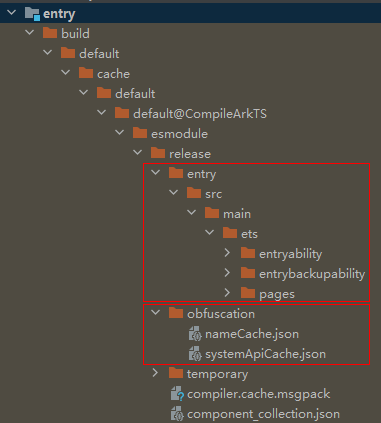
You can find the obfuscated files, name mapping file, and system API trustlist file in the **build** directory of the build product.
- Obfuscated file directory: build/default/[...]/release/moduleName
- Directory of the name mapping file and system API trustlist file: build/default/[...]/release/obfuscation
- The name mapping file, named **nameCache.json**, records the mappings between source code names and names after obfuscation.
- The system API trustlist file, named **systemApiCache.json**, records the APIs and property names that will be kept.
### Troubleshooting
1. Configure the **-disable-obfuscation** option in **obfuscation-rules.txt** to disable obfuscation, and check whether the exception is caused by obfuscation.
2. If the function is abnormal after obfuscation is enabled, read the document to understand the capabilities of obfuscation rules, such as [-enable-property-obfuscation](#keep-options), [-enable-toplevel-obfuscation](#keep-options), [-enable-filename-obfuscation](#keep-options), and [-enable-export-obfuscation](#keep-options), and the syntax scenarios that require the configuration of a [trustlist](#keep-options) to ensure that the application functions properly. The following briefly describes the four keep options that are enabled by default. For details, see the complete description of the corresponding options.
1. [-enable-toplevel-obfuscation](#keep-options): keeps top-level scope name from being obfuscated.
2. [-enable-property-obfuscation](#keep-options): keeps properties from being obfuscated. You need to use [-keep-property-name](#keep-options) to configure a trustlist for specified property names in scenarios where obfuscation is not allowed, such as network data access, JSON field access, dynamic property access, and .so library API calls.
3. [-enable-export-obfuscation](#keep-options): keeps exported names from being obfuscated. Generally, this option is used together with the preceding two options. You need to use [-keep-global-name](#keep-options) to configure a trustlist for exported or imported names in scenarios where external APIs of the module cannot be obfuscated.
4. [-enable-filename-obfuscation]: keeps file names from being obfuscated. You need to use [-keep-file-name](#keep-options) to configure a trustlist for file paths and names in scenarios where file paths are dynamically imported or directly loaded at runtime.
3. If you find a [troubleshooting](#troubleshooting) case similar to your scenario, you can quickly resolve the issue by following the recommended solution.
4. If no similar case is found, you should identify the issue by examining the configuration functions. If the relevant functions are unnecessary, you can remove the corresponding configuration items.
5. Analyze application crashes during running as follows:
1. Open the application run log or click the Crash dialog box in DevEco Studio to find the crash stack.
2. The line number in the crash stack is the line number of the [build product](#viewing-the-obfuscation-effect), and the method name may also be the obfuscated name. Therefore, you are advised to check the build product based on the crash stack, analyze the names that cannot be obfuscated, and add them to the trustlist.
### **FAQs**
#### Errors That May Occur When -enable-property-obfuscation Is Configured
**Case 1**: The error message "Cannot read property 'xxx' of undefined" is reported.
```
// Before obfuscation
const jsonData = ('./1.json')
let jsonStr = JSON.parse(jsonData)
let jsonObj = jsonStr.jsonProperty
// After obfuscation
const jsonData = ('./1.json')
let jsonStr = JSON.parse(jsonData)
let jsonObj = jsonStr.i
```
After property obfuscation is enabled, **jsonProperty** is obfuscated as a random character **i**. However, the original name is used in the JSON file, causing the error.
**Solution**: Use the **-keep-property-name** option to add the fields used in JSON files to the trustlist.
**Case 2**: An error message is reported when database-related fields are used and property obfuscation is enabled.
The error message is "table Account has no column named a23 in 'INSET INTO Account(a23)'."
Database fields are used in the code. During obfuscation, the field names in the SQL statements are obfuscated, but the original field names are used in the database, causing the error.
**Solution**: Use the **-keep-property-name** option to add the database fields to the trustlist.
#### Errors That May Occur When -enable-export-obfuscation and -enable-toplevel-obfuscation Are Configured
When the two options are configured, method name confusion in the following scenarios is involved when the main module calls the methods of other modules:
| Main Module| Dependent Module| Confusion of Imported and Exported Names|
| ------- | ------- | ----------------------------|
| HAP/HSP | HSP | The HSP and main module are built independently, and different names are generated after obfuscation. Therefore, a trustlist must be configured for both the HSP and main module.|
| HAP/HSP | Local HAR| The local HAR is built together with the main module. After obfuscation, the names are the same.|
| HAP/HSP | Third-party library | The names and properties exported from a third-party library are collected to the trustlist. They are not confused during import and export.|
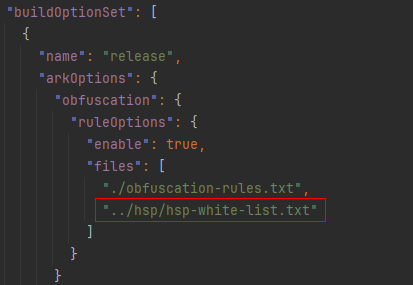
For the HSP, you must add the methods used by other modules to the trustlist. You must add the same trustlist for the main module. Therefore, you are advised to add the obfuscation file configured with the trustlist (for example, **hsp-white-list.txt**) to the obfuscation configuration item of the module that depends on the obfuscation file, that is, the **files** field shown in the following figure.
**Case 1**: When a class is dynamically imported, the class definition is confused, but the class name is not, causing an error.
```
// Before obfuscation
export class Test1 {}
let mytest = (await import('./file')).Test1
// After obfuscation
export class w1 {}
let mytest = (await import('./file')).Test1
```
The exported class **Test1** is a top-level domain name. When **Test1** is dynamically used, it is a property. Because the **-enable-property-obfuscation** option is not configured, the class name is confused, but the property name is not.
**Solution**: Use the **-keep-global-name** option to add **Test1** to the trustlist.
**Case 2**: For a method in a namespace, the method definition is confused, but the statement that uses the method is not, causing an error.
```
// Before obfuscation
export namespace ns1 {
export class person1 {}
}
import {ns1} from './file1'
let person1 = new ns1.person1()
// After obfuscation
export namespace a3 {
export class b2 {}
}
import {a3} from './file1'
let person1 = new a3.person1()
```
**person1** in the namespace is a top-level class name. When it is called by using **ns1.person1**, **person1** is a property and is not obfuscated because property obfuscation is not enabled.
**Solution:**
1. Configure the **-enable-property-obfuscation** option.
2. Use the **-keep-global-name** option to add the methods exported from the namespace to the trustlist.
**Case 3**: When declare global is used, a syntax error is reported after obfuscation.
```
// Before obfuscation
declare global {
var age : string
}
// After obfuscation
declare a2 {
var b2 : string
}
```
The error message "SyntaxError: Unexpected token" is reported.
**Solution**: Use **-keep-global-name** to **add __global** to the trustlist.
#### The **-enable-string-property-obfuscation** option is not configured, but the string literal property name is obfuscated. As a result, the value of the string literal property name is undefined.
```
person["age"] = 22; // Before obfuscation
person["b"] = 22; // After obfuscation
```
**Solution:**
1. Check whether **-enable-string-property-obfuscation** is configured for the dependent HAR. If it is configured, the main project will be affected, and you should disable it.
2. If it must be configured, add the property name to the trustlist.
3. If it is not configured and the SDK version is earlier than 4.1.5.3, update the SDK.
#### Errors That May Occur When -enable-filename-obfuscation Is Configured
**Case 1**: The error message "Error Failed to get a resolved OhmUrl for 'D:code/MyApplication/f12/library1/pages/d.ets' imported by 'undefined'" is reported.
As shown below, the outer layer of the **library1** module contains a directory named **directory**. When file name obfuscation is enabled, **directory** is obfuscated as **f12**, causing the error indicating that the path is not found.
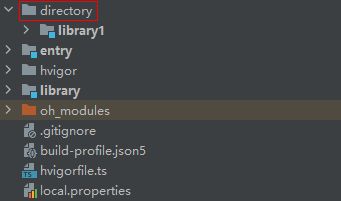
**Solution:**
1. If the project directory structure and error message are similar, update the SDK to 5.0.0.26 or later.
2. Use the **-keep-file-name** option to add the directory name **directory** of the module to the trustlist.
**Case 2**: The error message "Cannot find module 'ets/appability/AppAbility' which is application Entry Point" is reported.
The system loads the ability file when the application is running. Therefore, you must manually configure the trustlist to prevent the specified file from being obfuscated.
**Solution**: Use the **-keep-file-name** option to add the path corresponding to the **srcEntry** field in the **src/main/module.json5** file to the trustlist.
```
-keep-file-name
appability
AppAbility
```
#### Errors That May Occur When -keep-global-name and a Trustlist Are Configured
The error message "Cannot read properties of undefined (reading 'has')" is reported.
**Solution**: Upgrade the SDK to 4.1.6.3 or later.