# Starting a File Application
## When to Use
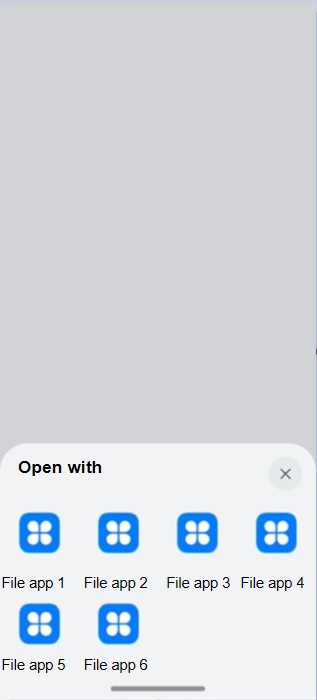
You can call [startAbility](../reference/apis-ability-kit/js-apis-inner-application-uiAbilityContext.md#uiabilitycontextstartability) to enable the system to search for an application that can handle the intent of opening a file from installed applications. For example, after downloading a PDF file from a browser, you can call this API to start a file application to open the PDF file. You must set the file URI (specified by [uri](#key-api-parameters)) and type (specified by [type](#key-api-parameters)) and other fields in the request so that the system can identify the file to open. Then the system directly starts an application to open the file or displays a dialog box for users to select an application to open the file.
**Figure 1** Example of opening a file
## Key API Parameters
You can call [startAbility](../reference/apis-ability-kit/js-apis-inner-application-uiAbilityContext.md#uiabilitycontextstartability) to start an installed vertical application to open a file.
**Table 1** Description of [want](../reference/apis-ability-kit/js-apis-app-ability-want.md) in startAbility
| Parameter| Type | Mandatory| Description |
|----------|--------|----------|---------------------|
| uri | string | Yes | URI of the file to open. This parameter is used together with **type**.
The URI format is file:\/\/bundleName\/path.
- **file**: indicates a file URI.
- *bundleName*: specifies the owner of the file.
- *path*: specifies the application sandbox path of the file.|
| type | string | No | MIME type of the file to open, for example, **'text/xml'** and **'image/*'**. For details about the MIME type definition, see https://www.iana.org/assignments/media-types/media-types.xhtml?utm_source=ld246.com. |
| parameters | Record | No | Custom parameters that are defined by the system and assigned values by developers as required. For details, see Table 2. |
| flags | number | No| Processing mode. For details, see Table 3. |
**Table 2** Description of [parameters](../reference/apis-ability-kit/js-apis-app-ability-wantConstant.md#wantconstantparams)
| Parameter | Type | Description |
|---------------------------------------|---------|---------------------------------------------------------------------------------------------------------------------------------------------------------------------|
| ability.params.stream | string | File URIs to be authorized to the target application. This parameter is used when the file to open depends on other files. For example, opening a local HTML file depends on other local resource files. The value must be an array of file URIs of the string type. For details about how to obtain the file URI, see the **uri** parameter in Table 1.|
| ohos.ability.params.showDefaultPicker | string | Whether to display a dialog box to ask users to select a file opening mode when only one matching application is found.
- **false**: The display of the dialog box is determined by the system policy or default application settings.
- **true**: Such a dialog box is always displayed. The default value is **false**. |
**Table 3** Description of [flags](../reference/apis-ability-kit/js-apis-app-ability-wantConstant.md#wantconstantflags)
| Parameter | Value | Description |
|--------------------------------|------------|----------------------------|
| FLAG_AUTH_READ_URI_PERMISSION | 0x00000001 | Grants the permission to read the URI.|
| FLAG_AUTH_WRITE_URI_PERMISSION | 0x00000002 | Grants the permission to write data to the URI.|
## How to Develop
### Procedure for the Caller Application
1. Import the required modules.
```ts
// xxx.ets
import { fileUri } from '@kit.CoreFileKit';
import { UIAbility, Want, common, wantConstant } from '@kit.AbilityKit';
import { BusinessError } from '@kit.BasicServicesKit';
```
2. Obtain the [application file paths](application-context-stage.md#obtaining-application-file-paths).
```ts
// xxx.ets
// Assume that the bundle name is com.example.demo.
export default class EntryAbility extends UIAbility {
onWindowStageCreate(windowStage: window.WindowStage) {
// Obtain the application sandbox path of the file.
let filePath = this.context.filesDir + '/test1.txt';
// Convert the application sandbox path into a URI.
let uri = fileUri.getUriFromPath(filePath);
// The obtained URI is file://com.example.demo/data/storage/el2/base/files/test.txt.
}
// ...
}
```
3. Construct request data.
```ts
// xxx.ets
export default class EntryAbility extends UIAbility {
onWindowStageCreate(windowStage: window.WindowStage) {
// Obtain the application sandbox path of the file.
let filePath = this.context.filesDir + '/test.txt';
// Convert the application sandbox path into a URI.
let uri = fileUri.getUriFromPath(filePath);
// Construct the request data.
let want: Want = {
uri: uri,
type: 'text/plain', // Type of the file to open.
// Grant the read and write permissions on the file to the target application.
flags: wantConstant.Flags.FLAG_AUTH_WRITE_URI_PERMISSION | wantConstant.Flags.FLAG_AUTH_READ_URI_PERMISSION
};
}
// ...
}
```
4. Call the API to start the target application.
```ts
// xxx.ets
export default class EntryAbility extends UIAbility {
onWindowStageCreate(windowStage: window.WindowStage) {
// Obtain the application sandbox path of the file.
let filePath = this.context.filesDir + '/test.txt';
// Convert the application sandbox path into a URI.
let uri = fileUri.getUriFromPath(filePath);
// Construct the request data.
let want: Want = {
uri: uri,
type: 'text/plain', // Type of the file to open.
// Grant the read and write permissions on the file to the target application.
flags: wantConstant.Flags.FLAG_AUTH_WRITE_URI_PERMISSION | wantConstant.Flags.FLAG_AUTH_READ_URI_PERMISSION
};
// Call startAbility.
this.context.startAbility(want)
.then(() => {
console.info('Succeed to invoke startAbility.');
})
.catch((err: BusinessError) => {
console.error(`Failed to invoke startAbility, code: ${err.code}, message: ${err.message}`);
});
}
// ...
}
```
### Procedure for the Target Application
1. Declare the capability to open files.
Applications that are able to open files must declare the file opening capability in the [module.json5](../quick-start/module-configuration-file.md) file. The **uris** field indicates the type of the URIs, and the **scheme** field is fixed at **file**. The **type** field indicates the types of files that can be opened. For details, see [MIME Definition](https://www.iana.org/assignments/media-types/media-types.xhtml?utm_source=ld246.com). In the following example, the file type is TXT.
```ts
{
"module": {
// ...
"abilities": [
{
// ...
"skills": [
{
"actions": [
"ohos.want.action.viewData" // Mandatory. Declare the data processing capability.
],
"uris": [
{
// Declare the capability of opening local files whose URIs start with file://.
"scheme": "file", // Mandatory. Declare that the scheme type is file.
"type": "text/plain", // Mandatory. Specify the type of file that can be opened.
"linkFeature": "FileOpen" // Mandatory. Specify that the URI is used to open files.
}
// ...
]
// ...
}
]
}
]
}
}
```
2. Process the file.
After the target application is started and obtains the URI of the file to open from the [want](../reference/apis-ability-kit/js-apis-app-ability-want.md) information, it opens the file and obtains the corresponding file object for reading and writing.
```ts
// xxx.ets
import fs from '@ohos.file.fs';
import { Want } from '@kit.AbilityKit';
import { BusinessError } from '@kit.BasicServicesKit';
export default class EntryAbility extends UIAbility {
onCreate(want: Want, launchParam: AbilityConstant.LaunchParam) {
// Obtain the uri field from the want information.
let uri = want.uri;
if (uri == null || uri == undefined) {
console.info('uri is invalid');
return;
}
try {
// Perform operations on the URI of the file as required. For example, open the URI to obtain the file object in read/write mode.
let file = fs.openSync(uri, fs.OpenMode.READ_WRITE);
console.info('Succeed to open file.');
} catch (err) {
let error: BusinessError = err as BusinessError;
console.error(`Failed to open file openSync, code: ${error.code}, message: ${error.message}`);
}
}
}
```